
The Pomodoro method splits study into timed rounds: classically 25 minutes of work, a 5-minute break, and a longer break after four rounds. BlockGain runs the rounds for you and locks distracting apps until each focus round ends.
The short version:
- One task per round, written down before the timer starts.
- 25 + 5 is a good default; try 50 + 10 for deep problem sets.
- Lock distracting apps during the round, not just your notifications.
- Breaks away from the screen recharge you; scrolling breaks rarely do.
- Watch the countdown on the Lock Screen, so you never unlock to check the time.
Where the method comes from
The Pomodoro Technique was created by Francesco Cirillo. It's named after the tomato-shaped kitchen timer he used.
The core idea is simple. Work in a focused round, rest, and keep going in rounds. After four rounds, take a longer break.
Why it works for students
A whole evening of revision feels huge, so it's easy to put off. Twenty-five minutes feels small enough to start right now.
The break is already planned, too. You don't need a "quick look" at your phone mid-task, because a real break is only minutes away.
And stopping on time builds trust in the plan. When you know the round really ends, it's easier to give it your full attention.
Which round length should you use?
There's no single right length. Pick one by the kind of work in front of you.
| Pattern | Best for | Watch out for |
|---|---|---|
| 25 min + 5 min | Starting when you don't feel like it, memorising | Breaking flow on hard problems |
| 50 min + 10 min | Problem sets, essays, coding | Starting feels heavier |
| 15 min + 3 min | Very low-energy days | Too short for deep work |
Start with 25 + 5 for a week. If you keep wishing for more time when the timer rings, move up to 50 + 10.
Setting up a study round
- Pick one task: "Chapter 4 questions 1–10", not "biology".
- Set the timer and start straight away; don't tidy your desk first.
- If a thought pops up, write it on a note and get back to the task.
- When it rings, stop, even mid-sentence. Stopping on time makes the next start easier.
Writing the task down first matters more than it seems. A vague task like "revise" makes every round start with deciding what to do.
Keep your phone out of the round
Turning notifications off helps, but the habit of opening apps is the bigger problem. Your thumb can find a feed before you've decided to look.
In BlockGain, the focus timer (free) locks the apps you chose until it ends. Pomodoro mode (Pro) adds the breaks: focus rounds with breaks, such as 25 + 5 or 50 + 10, that move on by themselves.
The block holds even when BlockGain is closed, because iPhone enforces it with Apple's Screen Time. Open a blocked app and you get a stop screen with a tip, a study finding or a quote instead of the feed.
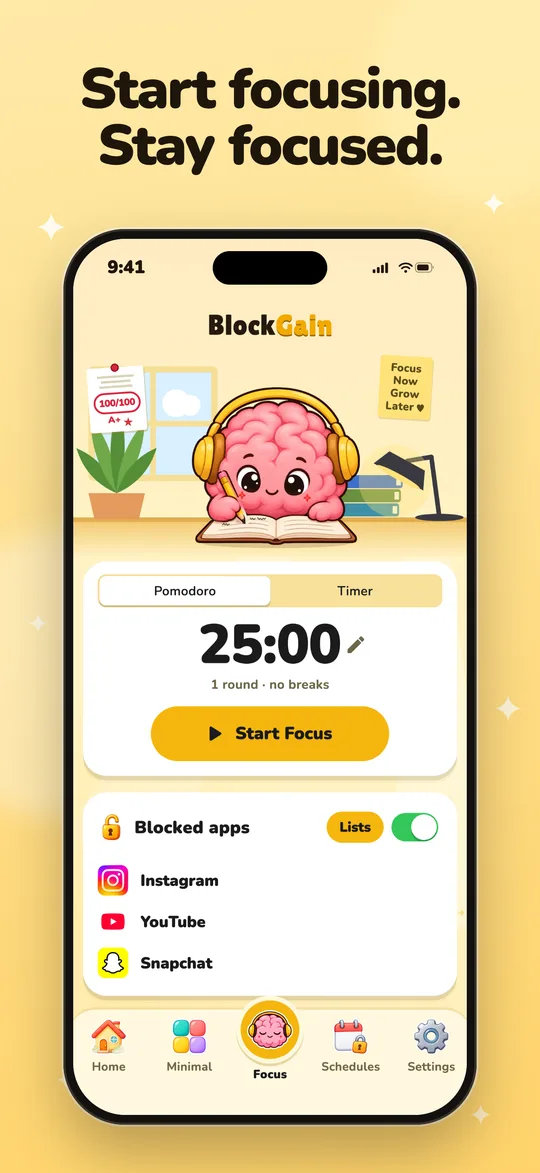 BlockGain's focus timer: pick a length and the apps to lock.
Check the time without unlocking
The countdown shows as a Live Activity on your Lock Screen and in the Dynamic Island. In BlockGain's Pomodoro mode, it shows "Focusing" or "Break time", so you always know which part of the round you're in.
That means you can keep the phone face down and still see the clock with a glance. Unlocking to check the time is how many scrolls start. Read more in your focus timer in the Dynamic Island.
What to do in the breaks
Stand up, drink water, look out of a window, stretch. The break is for your attention to recover.
A five-minute scroll usually turns into fifteen. It also fills your head with new things, so the next round starts more scattered than the last.
If you must check a message, do it, then put the phone back down. Calls and messages are never blocked in BlockGain unless you choose to block them.
 A good break looks like this: up, moving, away from the feed.
When you want to quit a round early
Some days the first ten minutes are hard. That's normal, and it usually passes.
In a normal session, ending early takes two steps: tap Leave early, then hold for 5 seconds. That small pause is often enough to change your mind.
If you know you'll give in, turn on strict mode (Pro). There's no stop button until the round ends, and the timer shows "Ends at …" instead. Our guide to strict mode explains when that's the right call.
Pomodoro with lectures
If your rounds include lecture videos, YouTube is the risky part. One video ends and the next suggestion starts.
YouTube study mode (Pro) lets only the channels you marked as study channels play during a focus session. See how to block YouTube but keep it for lectures, and how to study with your phone in the room for the rest of the desk setup.
Build a daily rhythm
Four rounds is a solid start: about two hours of focused work. Many students do two in the morning and two after lunch.
If you study at the same time each day, a schedule helps. BlockGain's Study time preset (Pro) locks your chosen apps on the hours you pick, and the Exam season preset suits revision weeks.
 The Study time preset in BlockGain keeps your study hours protected every day.
What we'd do, step by step
- Install BlockGain and connect Screen Time.
- Choose the apps that pull you away most often.
- Write one task on paper before you start.
- Start a Pomodoro with 25 + 5, or 50 + 10 for deep work.
- Take the breaks away from the screen.
- After four rounds, take a longer break and see how it felt.
The timer does the deciding. You just do the next round.
Sources
Common questions
How many Pomodoros should I do a day?
Start with four (about two hours of focused work) and build up. Quality matters more than the count.
Can I listen to music during a Pomodoro?
Yes, if it doesn't pull your attention. Music without lyrics works best for reading and writing.
What if I finish the task early?
Use the rest of the session to review what you did or start the next small task.
Is Pomodoro free in BlockGain?
The focus timer is free. Pomodoro rounds with breaks are part of BlockGain Pro, with a 7-day free trial on the yearly plan.
Can I stop a Pomodoro early?
In a normal session, tap Leave early, then hold for 5 seconds. In strict mode (Pro) there is no stop button until it ends.

We build BlockGain, the screen time app for iPhone that blocks the apps that eat your day, with a breathing pause and a few minutes when you really need one. We write about focus, phone habits and getting your time back.