Strict mode in BlockGain is a block with no stop button: once it starts, your chosen apps stay blocked until the time is up. Use it for short, high-stakes windows like exams, deadlines and bedtime.
The short version:
- Great for: exams, deep work, bedtime.
- Risky for: all-day blocks you might really need to break.
- Pair it with prevent uninstall so deleting the app isn't a way out.
- Calls and messages are never blocked unless you choose to block them.
- Keep a gentler daily limit for the rest of your day.
What strict mode changes
A normal BlockGain session has a way out. Tap Leave early, then hold for 5 seconds, and the session ends.
Strict mode (Pro) takes that away. There's no stop button until the session ends, and the timer shows "Ends at …" instead of Leave early, so you always know when it lifts.
Schedules can be strict too. And with prevent uninstall (Pro) on, BlockGain can't be deleted during a block, so removing the app isn't an escape route.
Normal vs strict at a glance
| Normal session | Strict session | |
|---|---|---|
| Ending early | Tap Leave early, hold 5 seconds | Not until it ends |
| Timer shows | Leave early | Ends at … |
| Blocked apps | Locked until it ends or you leave | Locked until it ends |
| Calls and messages | Never blocked unless you choose | Never blocked unless you choose |
| Works when BlockGain is closed | Yes | Yes |
Why a block you can't end works
Most blocks fail in the same moment. You're tired, the work is hard, and the stop button is right there.
Strict mode removes that moment. You make the decision once, when you're thinking clearly, and the phone keeps it for you.
We built BlockGain's strict mode for exactly that gap. The certainty is the point: you stop negotiating with yourself, because there's nothing to negotiate with.
When it helps
Strict mode shines when the cost of giving in is high and the window is short. Two hours before an exam, the first three hours of a workday, or 11 PM to 7 AM.
Good strict blocks have a clear start and end. You know what the time is for, and you know when you get your apps back.
 Strict mode is for the hours that matter most, when you want no way out.
When it backfires
A strict block across your whole day sounds strong but tends to end with you fighting the phone. If you might genuinely need an app for school, work or family, strict is the wrong tool for those hours.
Give that time to a daily limit instead. It's free for up to 3 apps: tap Ask my inner self on the stop screen, open the notification and take two slow breaths with the brain mascot.
If you still badly need it, the app opens for 5, 10 or 15 minutes, then locks again by itself. We explain why that holds up in why a short unblock beats a hard block.
Setting it up in BlockGain
You can turn strict mode on in three places.
- Focus session: turn on Strict before starting the timer.
- Schedule: turn on Strict in the schedule's settings.
- Prevent uninstall: turn it on in Settings, and it applies during blocks.
Once a strict session starts, the countdown shows as a Live Activity on the Lock Screen and in the Dynamic Island. You can see "Ends at …" at a glance. Read more in your focus timer in the Dynamic Island.
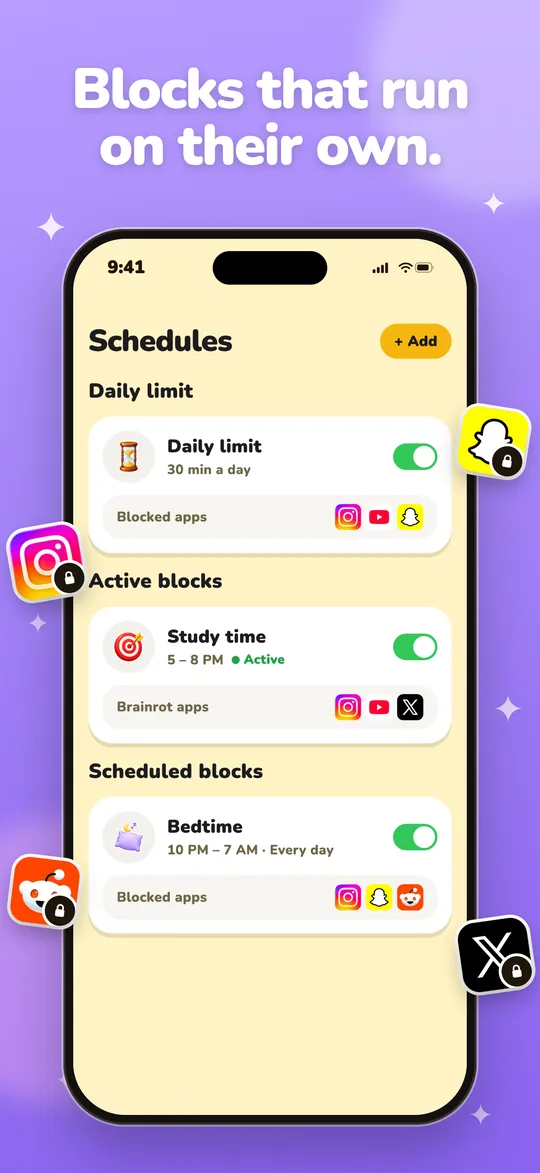 Any schedule in BlockGain can be made strict in its settings.
Strict mode for exams
Exam weeks are when strict mode earns its place. Pick your sharpest hours and give them to the hardest subject.
BlockGain's Exam season preset (Pro) sets up a study block you can adjust to your timetable. Make it strict, and the morning is protected before you've even sat down.
Our exam season phone plan shows a full day, with strict mornings and Pomodoro afternoons.
Strict mode for bedtime
Late-night scrolling pushes sleep later. The Sleep Foundation says screens can delay sleep and recommends avoiding them in the hour before bed.
A strict bedtime schedule means the decision is already made at 11 PM. There's no stop button to argue with when you're tired. See a bedtime phone schedule for times that work.
 A strict bedtime schedule keeps your chosen apps blocked until morning.
Is it safe to lock yourself out?
Yes, for the apps you pick. Calls and messages are never blocked in BlockGain unless you choose to block them, so people can always reach you.
The block is enforced by Apple's Screen Time, so it holds even when BlockGain is closed. That's what makes it reliable. It also means you should choose your hours with care.
Start small
Your first strict block should be one you're sure you'll finish. One hour is plenty.
A short block you finish builds trust in the habit. A long one you resent teaches you to avoid strict mode altogether. Add time once the short ones feel easy.
What we'd do, step by step
- Install BlockGain and connect Screen Time.
- Choose the apps that pull you away most.
- Start a one-hour focus session with Strict on.
- Turn on prevent uninstall in Settings.
- Make your morning or bedtime schedule strict once that feels easy.
- Keep a daily limit for the rest of the day.
Strict mode isn't about being hard on yourself. It's about deciding once, and letting the phone keep your word.
Sources
- Apple Support: Set up Screen Time for yourself on iPhone
- Sleep Foundation: How does blue light from electronic devices affect sleep?
Common questions
Can I end a strict session in an emergency?
Calls and messages are never blocked, so you can always reach people. Blocked apps stay closed until the session ends.
Does strict mode work while BlockGain is closed?
Yes. The block is enforced by Apple's Screen Time, not by the app being open.
Is strict mode free?
Strict mode is part of BlockGain Pro, with a 7-day free trial on the yearly plan. The focus timer is free.
How long should a strict block be?
Start with one to three hours. Short strict blocks you finish are worth more than long ones you break.
Can schedules be strict too?
Yes. Turn on Strict in a schedule's settings and that schedule has no stop button while it runs.

We build BlockGain, the screen time app for iPhone that blocks the apps that eat your day, with a breathing pause and a few minutes when you really need one. We write about focus, phone habits and getting your time back.