You can study with your phone in the room if it can't pull you in. Lock the distracting apps with a BlockGain focus timer, keep the phone face down at arm's length, and use it only as a timer.
The short version:
- Lock the feeds for the session, not just the notifications.
- Face down, arm's length: out of your hand, still in the room.
- Check the time on the Lock Screen, where the countdown sits.
- Lectures on YouTube? Only your study channels play.
- Class chat? Leave Messages out of the block and check it in breaks.
Why "just ignore it" doesn't work
Your phone is the easiest break in the room. Every pause in a hard problem is a chance to pick it up, and the feed is always ready.
Ignoring it means saying no again and again, every few minutes. That gets harder as you get tired, which is exactly when the work gets harder too.
The fix is to make picking it up pointless. If there's nothing to scroll, the urge fades much faster. That's the idea we built BlockGain around.
What a phone-in-the-room setup looks like
Here's how to keep each useful part of your phone while the distracting parts wait.
| Need | Setup in BlockGain | What stays locked |
|---|---|---|
| A timer | Focus timer (free) or Pomodoro (Pro) | The apps you chose |
| Lectures | YouTube study mode (Pro) | Shorts, recommendations, other channels |
| Class chat | Leave Messages out of the block | Feed apps |
| A quick check | Daily limit, 5 to 15-minute unblock (free) | The app, again when the time is up |
| Music | Leave your music app out | Everything else on the list |
Step 1: start a focus timer
Open BlockGain, pick how long you want to study, and choose the apps to lock. They stay locked until the timer ends.
The block holds even when BlockGain is closed, because iPhone enforces it through Apple's Screen Time. You don't need to keep the app open or check on it.
If you open a blocked app out of habit, you see a stop screen instead of the feed. In BlockGain the block screens rotate, with tips, study findings, quotes and a little tough love.
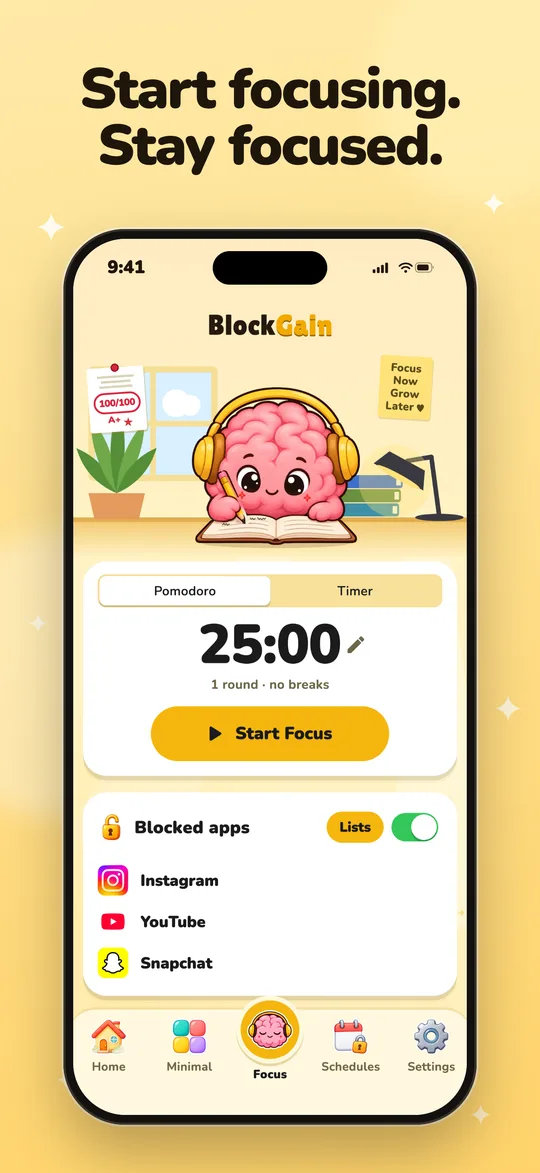 The focus timer in BlockGain: pick a length, pick the apps, start.
Step 2: put the phone face down
Put the phone face down, a little out of reach. On the desk is fine, as long as it's not in your hand.
You don't need to unlock it to see how long is left. The countdown shows as a Live Activity on the Lock Screen and in the Dynamic Island, so a glance is enough.
That small change matters. Unlocking to check the time is how many "quick looks" begin. Read more in your focus timer in the Dynamic Island.
Step 3: plan the breaks
Long sessions without breaks are hard to start. Short rounds with planned breaks are easier.
The Pomodoro Technique, created by Francesco Cirillo, uses 25 minutes of work and a 5-minute break, with a longer break after four rounds. BlockGain's Pomodoro mode (Pro) runs the rounds for you, and the Live Activity shows "Focusing" or "Break time".
Spend the breaks away from the screen if you can. Stand up, drink water, look out of a window. Our guide to Pomodoro for students has round lengths that suit revision.
When you need YouTube to study
YouTube is great for lectures and terrible for focus. One video ends and the next suggestion is already waiting.
In BlockGain, YouTube study mode (Pro) lets only the channels you marked as study channels play during your session. Search still shows any video, but only your study channels' videos play.
Found a new lecture mid-session? A channel that clearly teaches (its name says lectures, academy, physics…) can join right away. Others wait until the session ends. The full setup is in how to block YouTube but keep it for lectures.
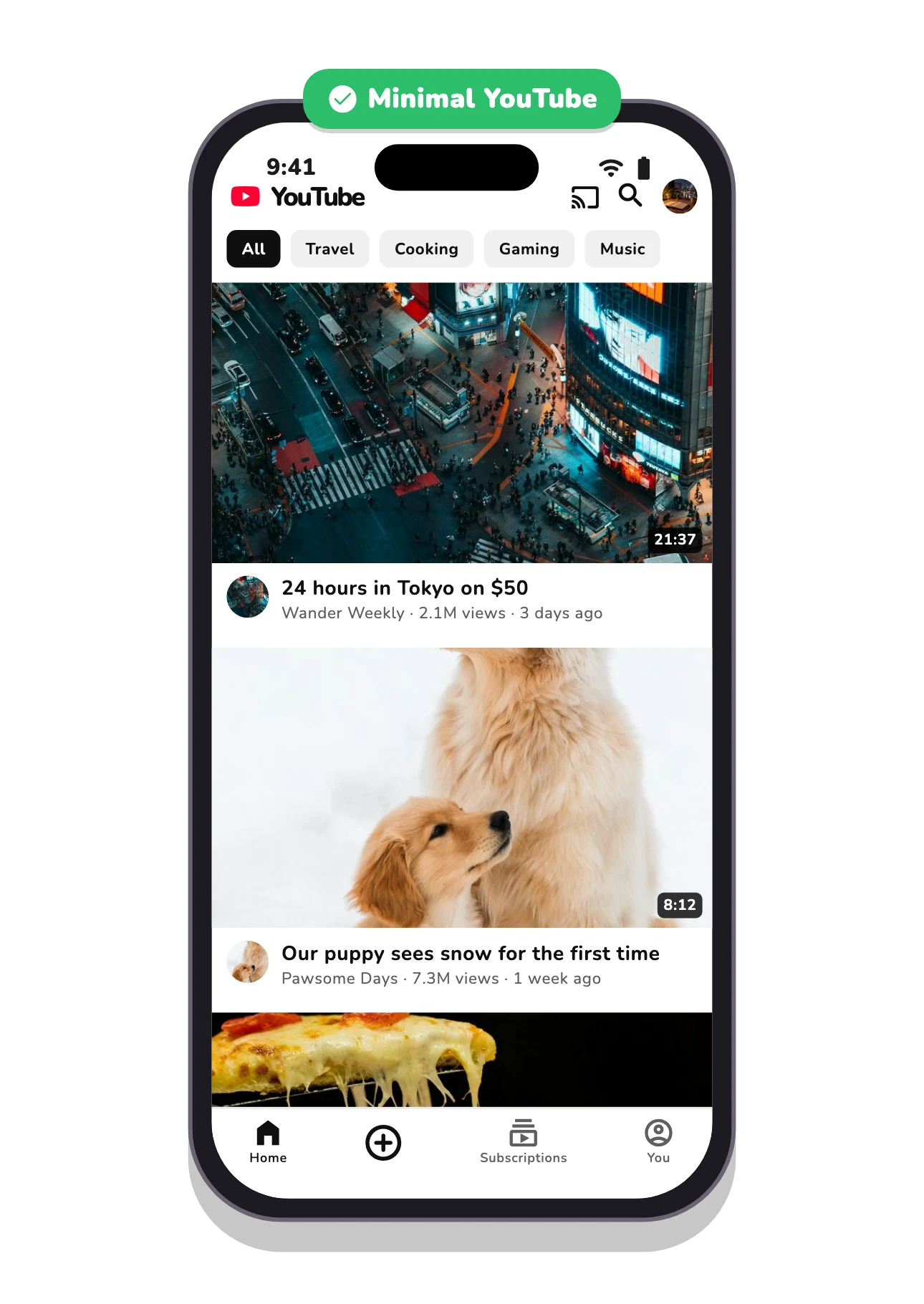 Outside study time, Minimal (Pro) gives you YouTube without Shorts or the endless feed.
Group chats and messages
Leave Messages and WhatsApp out of the block if your class uses them. Check them in breaks, not mid-task.
Calls and messages are never blocked in BlockGain unless you choose to block them. Your family can still reach you, and so can your study group.
If a social app hosts your study group, use the daily limit instead of leaving it open. Tap Ask my inner self on the stop screen, open the notification, take two slow breaths, and pick 5, 10 or 15 minutes. It locks again by itself.
We explain why in why a short unblock beats a hard block.
Cut the buzz too
Locked apps can't pull you in, but notifications can still light up the screen. Set up an iPhone Focus for study, so fewer alerts come through while you work.
Apple's guide to setting up a Focus on iPhone walks through it. Pair it with your BlockGain session and the phone goes quiet in both ways.
When the urge is strongest
The urge usually peaks in the first few minutes and when a problem gets hard. Both are normal.
When it hits, write down what you wanted to check on a sticky note. Then get back to the task. Most of those notes look a lot less urgent when the timer ends.
 The Study time preset (Pro) locks your chosen apps at the same time every day.
Make it a routine
If you study at the same time most days, a schedule saves you starting a timer each time. BlockGain's Study time preset (Pro) locks your chosen apps on the days and hours you pick.
For exam weeks, the Exam season preset goes further. See our exam season phone plan for a full day.
What we'd do, step by step
- Install BlockGain and connect Screen Time.
- Choose your feed apps and leave Messages and music out.
- Start a focus timer for 25 or 50 minutes.
- Put the phone face down and check the time on the Lock Screen.
- Mark your study channels if you learn from YouTube.
- Turn on a Study time schedule once the habit sticks.
The phone can stay in the room. It just stops being the most interesting thing in it.
Sources
- Francesco Cirillo, creator of the Pomodoro Technique
- Apple Support: Set up a Focus on iPhone
- Apple Support: Set up Screen Time for yourself on iPhone
Common questions
Is it better to leave the phone in another room?
If you can, yes. If you need it for a timer, a class chat or lectures, locking the feeds for the session gets you most of the benefit.
Can I listen to music during a session?
Yes. Leave your music app out of the block and pick the playlist before the timer starts.
Will I miss calls or messages while apps are locked?
No. Calls and messages are never blocked in BlockGain unless you choose to block them.
Is YouTube study mode free?
It is part of BlockGain Pro, with a 7-day free trial on the yearly plan. The focus timer is free.
How long should a study session be?
Try 25 minutes with a 5-minute break, or 50 and 10 for deeper work like problem sets and essays.

We build BlockGain, the screen time app for iPhone that blocks the apps that eat your day, with a breathing pause and a few minutes when you really need one. We write about focus, phone habits and getting your time back.