A Live Activity shows a live countdown on your Lock Screen and, on iPhones that have it, in the Dynamic Island. In BlockGain, you see your focus time left without unlocking, which is when the scroll usually starts.
The short version:
- Check the time without unlocking your phone.
- Focus sessions show the time left on the Lock Screen and in the Dynamic Island.
- Pomodoro rounds show Focusing or Break time and move on by themselves.
- Daily limit unblocks (5, 10 or 15 minutes) show the time left before the app locks again.
- Not showing? Check Settings → BlockGain → Live Activities.
Why unlocking is the risky moment
You pick up the phone to check the timer. You unlock it, and a notification is waiting. Two minutes later you are somewhere else, and the session you started is half forgotten.
The timer itself was never the problem. The problem is that checking it meant opening the door to everything else on your phone.
A Live Activity answers "how long is left?" before you unlock. You glance, you see the minutes, you put the phone back down.
What a Live Activity is
Live Activities are an iPhone feature that lets an app show live, changing information outside the app. You've probably seen them for deliveries, sports scores or a ride on its way.
On the Lock Screen, a Live Activity sits as a small card under the clock. On iPhones with the Dynamic Island, it also appears in the pill at the top of the screen while you use other apps.
The countdown runs by itself. You can close BlockGain, lock your phone or switch apps, and the time keeps ticking down.
What BlockGain shows, and when
We built BlockGain's Live Activities around the three moments you're most likely to reach for your phone. Each one shows only what you need to know.
| When | What the Live Activity shows | Free or Pro |
|---|---|---|
| Focus timer | Time left in the session | Free |
| Pomodoro | "Focusing" or "Break time", and the round's countdown | Pro |
| Daily limit unblock | Minutes left before the app locks again | Free (daily limit) |
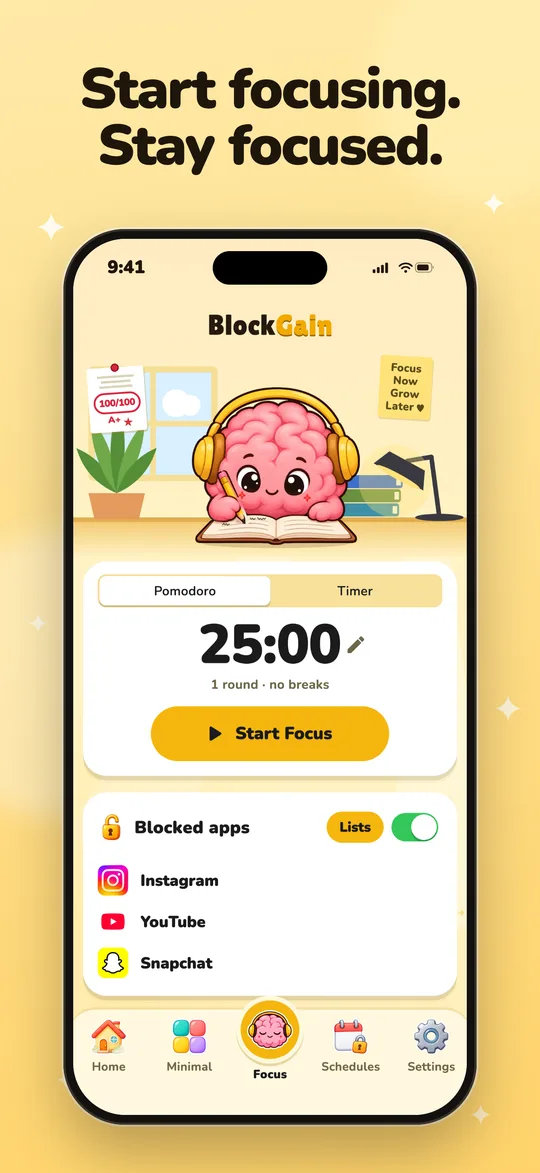 A focus session in BlockGain. The same countdown shows on your Lock Screen and in the Dynamic Island.
Focus sessions: a glance, not an unlock
Start a focus session in BlockGain and the countdown appears on your Lock Screen straight away. The apps you've chosen are blocked until the session ends.
If you study with your phone on the desk, this changes the habit. You can tap the screen to wake it, see how many minutes are left, and carry on. There's no reason to unlock at all.
For more on keeping a phone nearby without it taking over, read how to study with your phone in the room.
Pomodoro: rounds that move on by themselves
The Pomodoro Technique, created by Francesco Cirillo, splits work into focused rounds with short breaks in between. The hard part is keeping track of where you are without checking your phone every few minutes.
With BlockGain Pro, the Live Activity shows Focusing during a round and Break time during a break, with that round's countdown. When one ends, it moves on to the next by itself.
You never have to unlock to start the next round. That keeps your breaks as breaks, not as a slide into your feed.
 Focus, break, focus again. The Live Activity keeps count so you don't have to.
Our guide to Pomodoro for students covers round lengths and how to plan a study day around them.
Daily limit unblocks: you can see the door closing
BlockGain's daily limit keeps your chosen apps blocked all day. When you hit the stop screen, the one button is Ask my inner self. It sends a notification, and tapping it opens BlockGain for two slow breaths with the brain mascot.
If you still badly need the app, you pick 5, 10 or 15 minutes. During those minutes, a Live Activity shows how long is left, and when it reaches zero the app locks again, even if you're still in it.
Seeing the countdown helps. You finish the message you came to send instead of starting a new scroll. We explain the thinking in why a short unblock beats a hard block.
Turning Live Activities on
Live Activities are on by default. If the countdown doesn't show, go to Settings → BlockGain → Live Activities and make sure it's switched on.
A few things are normal and not a fault:
- BlockGain is open. iPhone hides an app's own Live Activity while that app is on screen. Switch to another app or lock your phone and it appears.
- Another app has a Live Activity. The Dynamic Island may show only one. Long-press it to see both.
- No Dynamic Island. iPhones without one still show the countdown on the Lock Screen.
Pair it with a Focus mode
A Live Activity stops you unlocking to check the time. An iPhone Focus mode filters notifications, so fewer things light up the screen in the first place.
Together they cover both halves of the problem. Set up a Focus for study or work in Settings, then start your BlockGain session.
 Fewer reasons to pick up the phone, and nothing to unlock when you do.
If you want the session to be impossible to cancel early, strict mode (Pro) removes the stop button until the timer ends.
What we'd do, step by step
- Install BlockGain and connect Screen Time.
- Choose the apps you want blocked during focus.
- Start a focus session and lock your phone.
- Glance at the Lock Screen whenever you want to know the time left.
- Try Pomodoro rounds if you work better with breaks.
The best focus timer is the one you can check without losing your place. On iPhone, that's a Live Activity.
Sources
Common questions
Which iPhones show the Dynamic Island?
iPhones with the Dynamic Island show it there; every iPhone with Live Activities shows the Lock Screen countdown.
Does the countdown keep going if I close BlockGain?
Yes. It counts down by itself.
Is the Live Activity free?
Yes, it comes with the focus timer and the daily limit.
Why don't I see it while BlockGain is open?
iPhone hides an app's own Live Activity while that app is on screen.
What if another app's Live Activity is already running?
Long-press the Dynamic Island to see both.

We build BlockGain, the screen time app for iPhone that blocks the apps that eat your day, with a breathing pause and a few minutes when you really need one. We write about focus, phone habits and getting your time back.