For exam season, plan your phone like your revision. Use strict blocks for your best hours, Pomodoro rounds for the rest, a tight daily limit for messages, and a phone-free bedtime. BlockGain can set all four up in one evening.
The short version:
- Mornings: a strict block for your hardest subject.
- Afternoons: Pomodoro rounds with breaks.
- All day: a 15-minute daily limit for quick checks.
- Lectures: YouTube study mode, so only your study channels play.
- Night: a bedtime block, every night.
Why exam weeks need a plan
Stress makes the phone more tempting, not less. When revision feels hard, a quick scroll feels like relief, and it's always one tap away.
A plan decided on a calm Sunday holds up better than willpower on a tired Wednesday. You make the choice once, and the phone keeps it for you all week.
That's why we built BlockGain around blocks that stay on. You set them up when you're thinking clearly, not in the middle of a hard chapter.
The plan at a glance
Here's a sample day. Move the times to match when you study best, but keep the shape.
| Time | Phone setup | What it protects |
|---|---|---|
| 9 AM – 12 PM | Strict block: hardest subject | Your sharpest hours |
| 12 – 1 PM | Break, daily limit for messages | A real rest |
| 1 – 5 PM | Pomodoro rounds (50 + 10) | Steady work with breaks |
| Evening | Light review, daily limit on | Revision without the feed |
| 10 PM – 7 AM | Bedtime block | Sleep before the big day |
 The Study time preset. Pick your subjects' hours and the apps to keep out.
Mornings: a strict block for the hardest subject
Most people have one stretch of the day when their head is clearest. Give it to the subject you're most worried about.
Strict mode in BlockGain (Pro) means there's no stop button until the session ends. You can't talk yourself out of it ten minutes in, because there's nothing to tap.
Two to three hours is a good length. Long enough to get deep into a topic, short enough that you'll actually start. Our guide to strict mode explains how it works.
If you know you'd delete the app to get out of a block, turn on Prevent uninstall (Pro) as well. It stops BlockGain being removed while a block is running.
Afternoons: Pomodoro rounds with breaks
After lunch, focus usually drops. Shorter rounds with breaks keep you moving without burning out.
The Pomodoro Technique, created by Francesco Cirillo, splits work into focused rounds with short breaks in between. In BlockGain Pro, Pomodoro rounds run by themselves, and the countdown shows on your Lock Screen and in the Dynamic Island.
You can see "Focusing" or "Break time" without unlocking. Read Pomodoro for students for round lengths that suit revision, and your focus timer in the Dynamic Island for how the countdown works.
All day: a tight daily limit
You don't need to vanish for exam season. Friends, family and group chats still matter, and a total ban often gets switched off by day three.
The daily limit (free for up to 3 apps) keeps your chosen apps blocked all day. The stop screen has one button, Ask my inner self. Tap the notification it sends, take two slow breaths in BlockGain, then choose "Never mind" or "I badly need it".
If you need it, that app opens for 5, 10 or 15 minutes, then locks again, even while you're in it. A 15-minute budget is up to three 5-minute checks or one 15-minute unblock a day. When the budget is gone, the apps stay blocked until midnight.
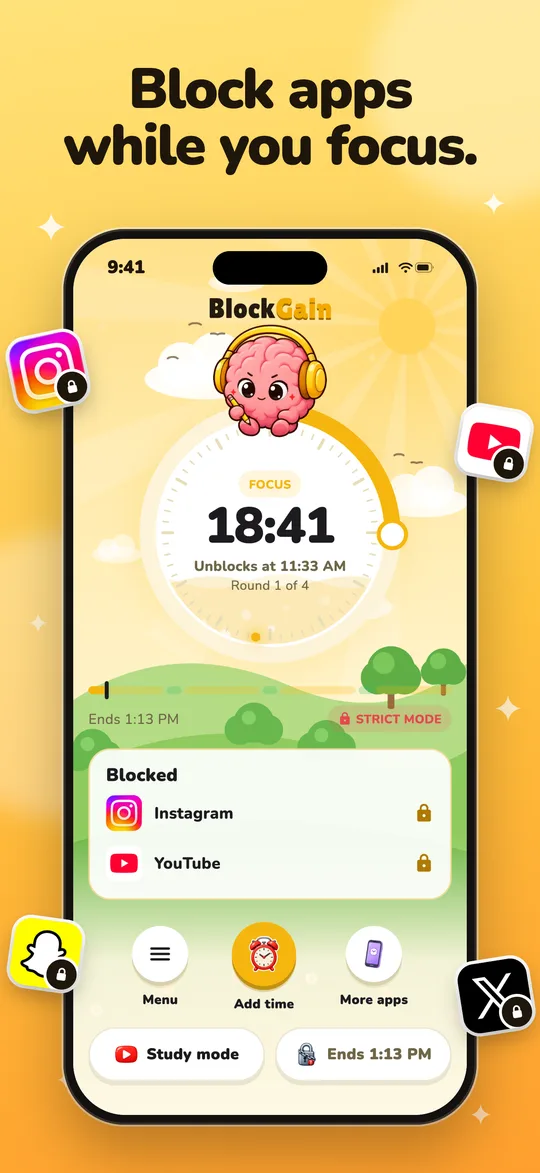 Your blocked apps in BlockGain. Messages still work; the feeds wait.
Lectures without the rabbit hole
Revision often means YouTube. A lecture video is useful; the recommendations next to it are not.
YouTube study mode (Pro) lets only the channels you've marked as study channels play during a focus session. Anything else is sent back. See how to block YouTube but keep it for lectures for the setup.
Use the Exam season preset
You don't have to build all this from scratch. BlockGain's Exam season preset (Pro) sets up a study block you can adjust to your timetable.
Pair it with a 15-minute daily limit so a quick reply doesn't turn into an hour. Add an iPhone Focus mode for study, so fewer notifications light up the screen in the first place.
Sleep is part of revision
Late-night scrolling pushes sleep later. The Sleep Foundation says screens can delay sleep and recommends avoiding them in the hour before bed.
Tired revision is slow revision. A bedtime block protects the sleep you need to remember what you studied, and it means the decision is already made at 11 PM.
 The Bedtime preset blocks your chosen apps every night of exam season.
After the exams
Turn the strict blocks off, keep the daily limit and see how it feels. Many people keep a lighter version of their exam setup once they notice how much calmer it is.
If the phone was a problem before exams too, read phone addiction for students for a longer-term plan.
What we'd do, step by step
- Install BlockGain and connect Screen Time.
- Add your feed apps to the daily limit with a 15-minute budget.
- Turn on the Exam season preset and move it to your best hours.
- Switch on strict mode for the morning block.
- Mark your study channels for YouTube study mode.
- Add a bedtime block for every night until the last exam.
Sources
- Francesco Cirillo, creator of the Pomodoro Technique
- Sleep Foundation: How does blue light from electronic devices affect sleep?
- Apple Support: Set up a Focus on iPhone
Common questions
Should I delete social media during exams?
Blocking is easier to undo afterwards and keeps your group chats reachable.
How long should a strict block be?
Two to three hours, matching your most focused time of day.
Are presets and strict mode free?
They are part of BlockGain Pro. The focus timer and the daily limit (up to 3 apps) are free.
What if I need a lecture video?
Use YouTube study mode so only your study channels play during focus.
What if I give in and switch the block off?
Strict mode has no stop button until it ends, and Prevent uninstall stops you deleting the app during a block. Both are part of Pro.

We build BlockGain, the screen time app for iPhone that blocks the apps that eat your day, with a breathing pause and a few minutes when you really need one. We write about focus, phone habits and getting your time back.