
The best study timer app for students on iPhone is BlockGain. Its free timer blocks your distracting apps with Screen Time until the time is up and shows the countdown on your Lock Screen. Pomodoro rounds with breaks come with Pro.
The short version:
- A good study timer does four things: blocks apps, gives you breaks, shows your study time and works on the Lock Screen.
- BlockGain blocks apps, shows your stats and runs on the Lock Screen for free. Pomodoro breaks are Pro.
- Forest is a good pick if a growing tree keeps you going, and its free plan blocks apps too.
- Focus To-Do suits students who want a timer and a task list in one app.
What a good study timer app needs
A plain countdown is easy to find. The clock app on your iPhone has one. What a student needs is a timer that makes the 25 minutes actually happen.
We think that comes down to four things:
- It blocks distracting apps. If TikTok still opens, the timer is only a suggestion.
- It has breaks. Short breaks between rounds, and a longer one after a few, so you don't burn out.
- It shows your study time. Seeing your hours add up is a big part of the motivation.
- It works on the Lock Screen. You should see the time left without unlocking, because unlocking is where the scrolling starts.
If the Pomodoro method is new to you, start with Pomodoro for students. It explains the rounds and why the breaks matter.
Study timer apps compared
We checked each app's own website and US App Store listing on 29 November 2026. We built BlockGain, so read this with that in mind. Where we couldn't confirm something, we left it out.
| App | Free to download | Blocks apps? | Breaks | Lock Screen timer | Paid plan |
|---|---|---|---|---|---|
| BlockGain | Yes | Yes, with Screen Time, free | Short and long, Pro | Yes, Live Activity | $19.99/yr, $4.99/mo, $39.99 once |
| Forest | Yes | Yes, Deep Focus, free | Not listed | Not listed | Plus: $35.99/yr or $5.99/mo |
| Flora | Yes | Kills your tree if you leave | Not listed | Not listed | Tours from $0.99 |
| Focus To-Do | Yes | Yes, added in 8.8 | Short and long | Yes, Live Activity | $11.99 lifetime, $3.99 for 3 months |
| Study Bunny | Yes | Not listed | Not listed | Not listed | Coin packs; "No Ads" from $14.99 |
| Opal | Yes | Yes | Not listed | Not listed | $99.99/yr, $19.99/mo, $399 once |
Prices are the US prices we saw on 29 November 2026 and may change. Forest's App Store listing shows its plans as "Early Bird" prices.
1. BlockGain: our pick for studying
Price: the plain focus timer is free. Pomodoro with breaks is Pro: $19.99 a year with a 7-day free trial, $4.99 a month or $39.99 once. No account, no ads.
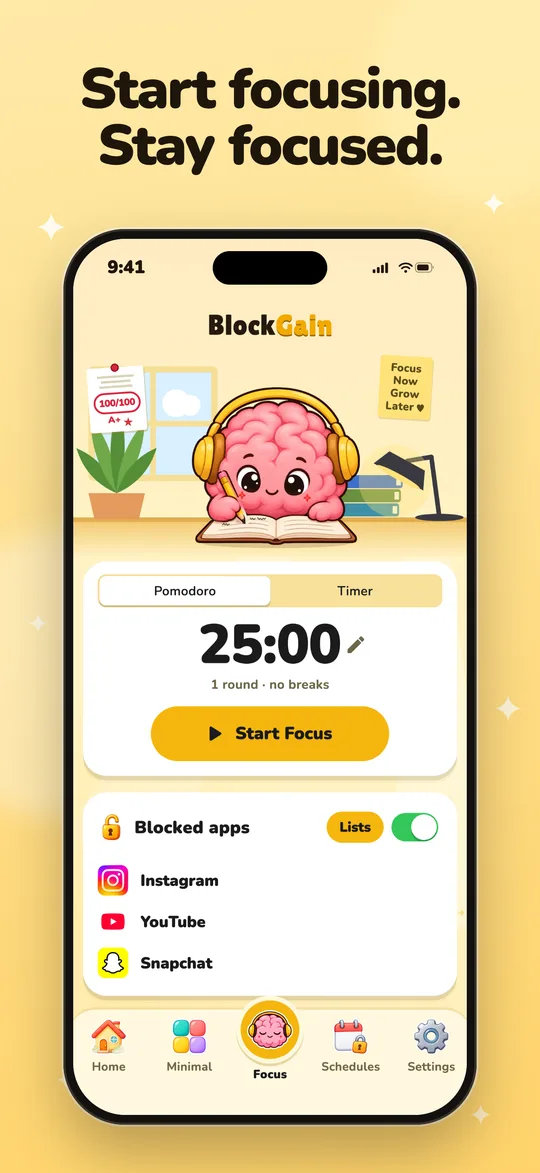 The focus timer in BlockGain: Timer is free, Pomodoro is Pro. Then tap Start Focus.
In BlockGain, the free Timer is one block of time with no breaks. Until it ends, the apps you picked are blocked with Apple's Screen Time and show a stop screen.
Pomodoro (Pro) splits your study into rounds with short and long breaks. Apps are blocked during rounds and free again during breaks.
Ending early is possible but slow on purpose. Leave early needs a 5-second hold, which is long enough to change your mind. If you are in the zone, Add time keeps the round going.
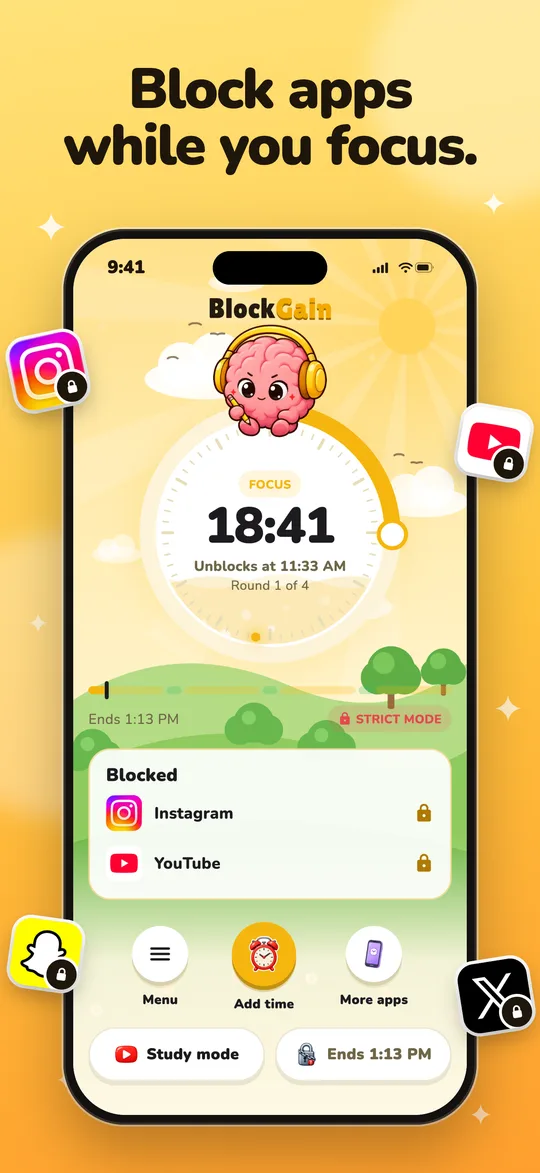 A focus session in BlockGain: the apps you picked are blocked until the round ends.
The countdown runs as a Live Activity on your Lock Screen and in the Dynamic Island. You see the time left without opening anything. We wrote more about this in the Live Activity focus timer.
Your screen time stats and a streak are free too. You can see your screen time, your pickups and your top apps.
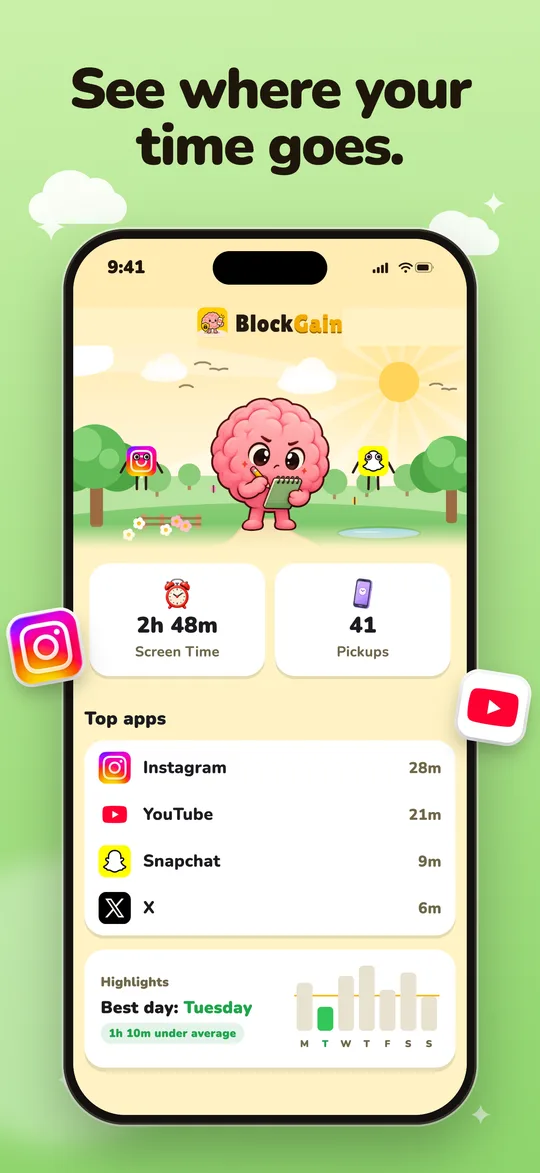 Stats in BlockGain: screen time, pickups and the apps you open most.
Pro adds Pomodoro rounds with breaks, unlimited apps, schedules, strict mode and website blocking. It also adds YouTube study mode, where only study channels play during focus. See how to block YouTube and keep your lectures.
2. Forest: best if a growing tree motivates you
Forest is the best-known focus timer on iPhone. You plant a tree when you start, and it grows while you stay focused.
We checked Forest's website: its free plan includes Deep Focus, which "blocks selected apps during an active focus session". It also includes Time Guard for one app or site. Forest Plus adds a custom app allowlist, Time Guard for more apps, focus analytics and an ad-free experience.
On the US App Store, Plus is listed at $35.99 a year or $5.99 a month. Forest's one-time Pro purchase is no longer offered to new users.
3. Flora: a free tree timer with real trees
Flora uses a similar idea. Its App Store listing says that if you leave the app while growing a tree, "the tree will be killed". It also has a to-do list, and daily, weekly and monthly stats.
Flora is free to download. Its in-app purchases are tours, from $0.99. An opt-in service lets you plant real trees.
The listing says Flora "blocks distracting apps in a pleasant way", but it doesn't say it uses Screen Time. The tree is the main nudge.
4. Focus To-Do: a timer and a task list
Focus To-Do mixes a Pomodoro timer with a to-do list. Its listing supports short and long breaks, detailed stats and reports, and a Live Activity with Dynamic Island support.
Its version notes say app blocking during timing was added in version 8.8. Premium is $11.99 for lifetime or $3.99 for 3 months on the US App Store.
5. Study Bunny: a cute study pet
Study Bunny pairs a study timer with a virtual bunny you look after. You earn coins as you study and spend them on items and music. It also has a to-do list, flashcards and a study tracker.
It is free to download. Its in-app purchases are coin packs, and two of them include "No Ads", starting at $14.99. Its App Store listing doesn't mention blocking other apps.
6. Opal: blocking first, timer second
Opal is an app blocker more than a study timer. Its free plan includes app blocking, 3 rules and "Basic Timers & Soundscapes". Opal Pro adds "Advanced Timers & Soundscapes" and Hard Mode.
Pro is $99.99 a year, $19.99 a month or $399 once, as listed on Opal's pricing page. If you mainly want blocking, our Opal alternatives post has the full price list.
 The short list: a timer that blocks apps, gives you breaks and shows your hours.
How to choose
- You want the timer to stop you scrolling: BlockGain or Forest. Both block apps for free.
- You want breaks built in: Focus To-Do, or BlockGain Pro (7-day free trial).
- You want a cute reason to stay: Forest, Flora or Study Bunny.
- You want blocking for the whole day, not just study time: see the best app blockers for iPhone.
If your phone is the problem even with a timer, try studying with your phone in the room. It covers where to put the phone and what to keep open.
What we'd do, step by step
 One round at a time.
- Install BlockGain and connect Screen Time.
- Pick the apps that pull you away. The free plan covers up to 3.
- Start with the free Timer at 25 minutes. Try Pomodoro with breaks in the Pro trial if you want rounds.
- Start Focus and put the phone face down. The Lock Screen shows the time left.
- Take a real break when the timer ends. In Pomodoro (Pro), apps are free in breaks and blocked again for the next round.
- Check your stats at the end of the week and see where the time went.
That's it. A timer that blocks apps, a countdown you can see, and your hours where you can see them.
Sources
- Forest: Focus for Productivity on the US App Store
- Forest: official website (Free and Plus features)
- Flora - Green Focus on the US App Store
- Focus To-Do: Focus Timer&Tasks on the US App Store
- Study Bunny: Focus Timer on the US App Store
- Opal pricing
- Apple Support: Set up Screen Time for yourself on iPhone
Common questions
What is the best study timer app for students?
Our pick is BlockGain. Its free focus timer blocks your distracting apps until the time is up and shows the countdown on your Lock Screen. Pomodoro rounds with breaks are part of Pro, with a 7-day free trial.
Is there a free study timer app that blocks apps?
Yes. BlockGain's focus timer is free and blocks apps with Apple's Screen Time during rounds. Forest's free plan also includes Deep Focus, which blocks selected apps during a session, as checked on 29 November 2026.
Can a study timer show on the iPhone Lock Screen?
Yes. BlockGain shows the countdown as a Live Activity on the Lock Screen and in the Dynamic Island. Focus To-Do's App Store notes also list Live Activity and Dynamic Island support.
Are apps blocked during breaks?
Not in BlockGain's Pomodoro mode, which is part of Pro. Apps are blocked during focus rounds and free during short and long breaks. The free timer is one block of time with no breaks.
Do I need an account to use BlockGain's study timer?
No. BlockGain has no account and no ads, and your data stays on your phone.

We build BlockGain, the screen time app for iPhone that blocks the apps that eat your day, with a breathing pause and a few minutes when you really need one. We write about focus, phone habits and getting your time back.