The best Opal alternative on iPhone is BlockGain: the same blocking (schedules, strict mode, a daily limit and a focus timer) for $19.99 a year instead of $99.99, with a free plan and YouTube and Instagram without Shorts and Reels.
The short version:
- Opal costs $99.99 a year, $19.99 a month or $399 once.
- BlockGain costs $19.99 a year, $4.99 a month or $39.99 once, with a free daily limit.
- Shorts and Reels: Opal's team says hiding them isn't possible in its iPhone app. BlockGain's Minimal does it.
- Other options: one sec, Jomo, Freedom, ClearSpace, Roots and Brainrot, each with a narrower focus.
Why people look for an Opal alternative
Opal is a well-known screen time app, and it has a free plan with 3 rules and basic timers. Most people who look elsewhere do so for one of two reasons.
- Price. Opal Pro is $99.99 a year, $19.99 a month or $399 for lifetime, with a 7-day trial on the yearly plan.
- Shorts and Reels. Opal's own team says hiding them isn't possible in its iPhone app.
We built BlockGain with both of those in mind. We checked every price in this post on 28 November 2026.
Opal alternatives compared
| App | Free plan | Yearly | Lifetime | Stands out for |
|---|---|---|---|---|
| BlockGain | Daily limit (3 apps), focus timer | $19.99 | $39.99 | Breathe-first unblocks, Minimal YouTube and Instagram |
| Opal | 3 rules, basic timers | $99.99 | $399 | Also on Android |
| one sec | 1 app | $19.99 | $99.99 | A breathing pause |
| Jomo | 1 session, 1 limit | $29.99 | $99.99 | iPhone, iPad and Mac |
| Freedom | Sessions up to 2 hours | $39.99 | $199 | Phone and computer |
| ClearSpace | Not listed | $44.99 | Not listed | Push-up and breathing challenges |
| Roots | Insights, 2 blocks | $59.99 | Not listed | Insights on your use |
| Brainrot | None (subscription only) | From $19.99 | Not listed | Subscription only |
Want just the two side by side? See BlockGain vs Opal, or every app at once in the best app blocker for iPhone.
1. BlockGain
BlockGain blocks apps with Apple's Screen Time. When you open a blocked app, you see a stop screen. Our block screens rotate between tips, findings from studies, quotes and nudges, each with its own colour and brain mascot.
 BlockGain: Screen Time blocking for iPhone, from $19.99 a year or free for up to 3 apps.
The free daily limit keeps up to 3 apps blocked all day. Tap "Ask my inner self" on the stop screen, and a notification opens BlockGain for two slow breaths with the brain mascot. If you still badly need it, that one app opens for 5, 10 or 15 minutes, then locks again even if you're still in it.
Each unblock comes from a daily budget of 15 to 120 minutes. When it's gone, the apps stay blocked until midnight. We explain why in why a short unblock beats a hard block.
Pro adds schedules with presets like Bedtime, Work hours and Exam season, Pomodoro rounds, strict mode, prevent uninstall during blocks, website blocking and Highlights.
Shorts and Reels: where BlockGain differs most
This is the gap people mention most. In BlockGain's Minimal, YouTube opens without Shorts and Instagram opens without Reels or the feed. Messages and search still work.
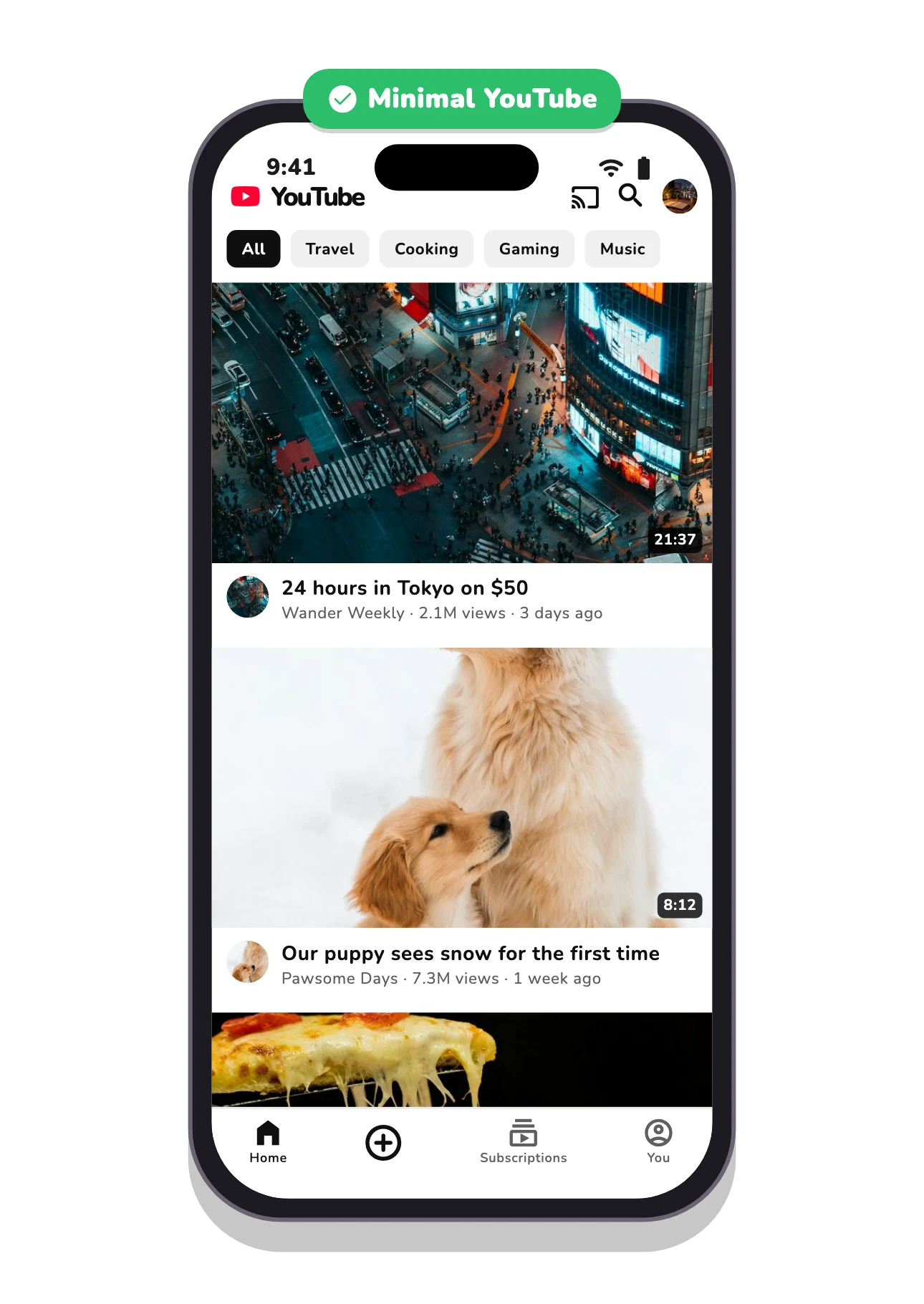 YouTube in BlockGain's Minimal: the videos you came for, no Shorts.
You block the full app, and open the Shorts-free version instead. See how to watch YouTube without Shorts and Instagram without Reels for the setup.
2. one sec
one sec puts a breathing pause in front of an app before it opens. One app is free; Pro is $19.99 a year, $6.99 a month or $99.99 lifetime.
It doesn't have Pomodoro. Like Opal, its help pages say blocking Shorts and Reels isn't possible on iPhone.
3. Jomo
Jomo works across iPhone, iPad and Mac. Its free plan is small (1 session, 1 limit), and paid plans are $29.99 a year or $99.99 lifetime.
4. Freedom
Freedom blocks across your phone and computer, which helps if your distractions follow you to a laptop. Free sessions run up to 2 hours; paid plans are $39.99 a year or $199 lifetime.
5. ClearSpace, Roots and Brainrot
ClearSpace is $44.99 a year and asks you to do push-up or breathing challenges. Roots has a free plan with insights and 2 blocks, and costs $59.99 a year. Brainrot has no free plan and starts from $19.99 a year.
How to switch from Opal
- Install BlockGain and connect Screen Time.
- Pick your worst apps for the daily limit (up to 3 free).
- Set a daily budget. 30 minutes is a good start.
- Remove Opal's blocks in its settings, so the two apps don't overlap.
- Try Pro free for 7 days if you want schedules, strict mode or Minimal.
There's no account to create and no ads. Apple keeps your screen time data on your iPhone.
Which Opal alternative should you pick?
- You want Opal's blocking for less: BlockGain.
- You want YouTube or Instagram without Shorts and Reels: BlockGain's Minimal.
- You want a pause, not a block: one sec.
-
You need your computer blocked too: Freedom.
-
You study and want timed sessions: BlockGain's focus timer, with Pomodoro rounds in Pro. See Pomodoro for students.
For most iPhone users, start with BlockGain's free plan and see how far it gets you. If you want more, try Pro free for 7 days before you pay.
Sources
Common questions
Is there a free alternative to Opal?
BlockGain's free plan keeps up to 3 apps blocked with short 5, 10 or 15-minute unblocks and includes a focus timer. It has no time limit and no ads.
Can I move from Opal to BlockGain?
Yes. Install BlockGain, connect Screen Time, pick your apps and set your daily limit; then remove Opal's blocks in its settings.
Is BlockGain as strict as Opal?
BlockGain has strict mode and prevent uninstall during blocks, both part of Pro.
How much cheaper is BlockGain?
$19.99 a year against $99.99, and $39.99 lifetime against $399, as checked on 28 November 2026.
Does Opal work on Android?
Yes, Opal also has an Android app. BlockGain is iPhone only for now.

We build BlockGain, the screen time app for iPhone that blocks the apps that eat your day, with a breathing pause and a few minutes when you really need one. We write about focus, phone habits and getting your time back.