
If your phone keeps pulling you away from study or costing you sleep, it is a habit worth breaking. The plan that works: block the worst apps with a daily limit in BlockGain, study in focus sessions, and block the feeds at bedtime.
The short version:
- Signs: you pick it up without deciding to, and lose study time and sleep.
- Plan: a daily limit, focus sessions and a bedtime block.
- Keep the useful parts: chats, lectures and your timer.
- Make it gentle: a short way in keeps the plan alive past the first week.
Signs your phone is winning
Most students don't need a diagnosis. They need an honest look at a normal day. If several of these sound familiar, the phone is costing you more than you'd like.
- You unlock it without deciding to.
- A "quick check" during study turns into twenty minutes.
- You scroll in bed and sleep later than you meant to.
- Starting work feels harder than it used to.
- You feel restless when the phone is in another room.
None of this makes you weak. Feeds are built to be hard to put down, and a student's day is full of small gaps they fill well. We built BlockGain to work with that pattern, not to shame you for it.
Start with your real numbers
Open Settings → Screen Time and look at your daily average and top apps. BlockGain's home screen shows the same picture: screen time, pickups and top apps.
You are looking for two things. Which two or three apps take the most time, and when in the day you lose it. That tells you where the plan should push hardest.
Step 1: a daily limit on your worst apps
Put your two or three worst apps in a daily limit. In BlockGain, that is free for up to 3 apps. They stay blocked all day and show a stop screen.
When you really need one, tap "Ask my inner self". The notification opens BlockGain, where you take two slow breaths with the brain mascot, then choose "Never mind" or "I badly need it". Pick 5, 10 or 15 minutes, and the app locks again when the time is up, even while you're in it.
You choose a daily budget, from 15 to 120 minutes, and each unblock spends 5, 10 or 15 of them. When it is gone, the apps stay blocked until midnight. That breathing pause before every unblock is the point, as we explain in why a short unblock beats a hard block.
 A blocked app in BlockGain. The stop screen rotates tips, study findings, quotes and nudges.
Step 2: study in focus sessions
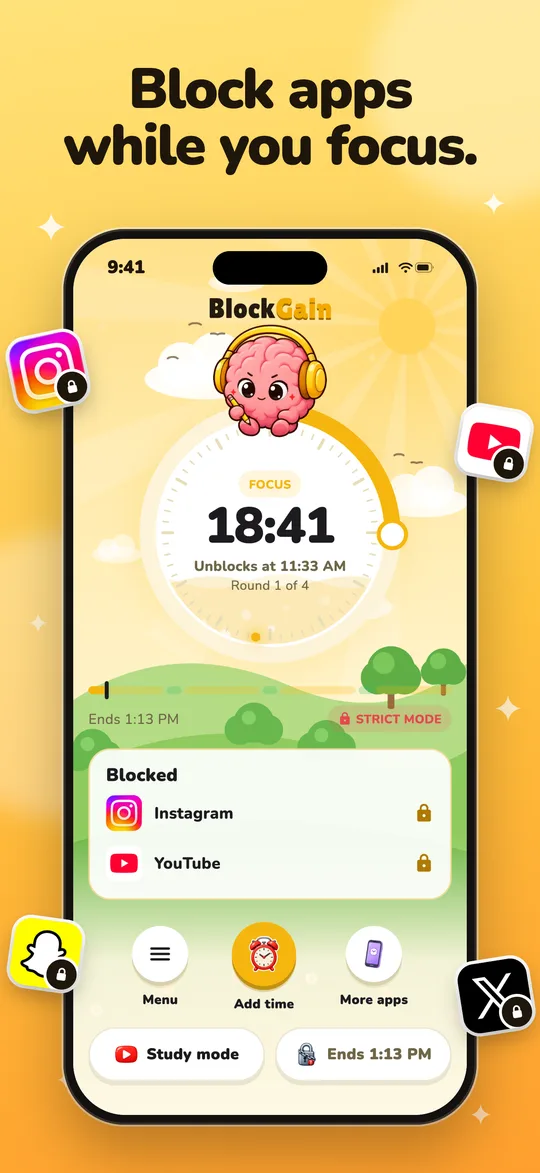
Study in timed sessions that lock the apps you chose. BlockGain's focus timer is free, and a Live Activity shows the countdown in the Dynamic Island and on the Lock Screen.
If you like working in rounds, Pomodoro with breaks is in Pro. The method comes from Francesco Cirillo: short, timed blocks of work with breaks between them. Our Pomodoro guide for students shows how to set it up.
On hard days, strict mode (Pro) removes the stop button until the session ends. It is useful the night before a deadline, when "just five minutes" is most tempting.
 BlockGain's Study time preset: the feeds wait while you read.
Step 3: keep lectures, lose the rabbit hole
YouTube is often both your best teacher and your worst distraction. Blocking it outright doesn't work if your course lives there.
BlockGain's YouTube study mode (Pro) lets only the study channels you choose play during focus. Anything else, Shorts included, is sent back. For the rest of the day, Minimal opens YouTube without Shorts. More in how to block YouTube but keep it for lectures.
Step 4: protect your sleep
Late-night scrolling is where most students lose the next morning. The Sleep Foundation says screens can delay sleep and recommends avoiding them in the hour before bed.
A bedtime block keeps the feeds shut at night, so you don't have to decide when you are tired. BlockGain Pro has Bedtime and Study time presets, and an Exam season preset for the weeks that count most. Apple's Focus modes can quiet notifications at the same time.
Your setup at a glance
| When | Setup | In BlockGain |
|---|---|---|
| All day | Daily limit on 2–3 apps | Free for up to 3 apps |
| Study | Focus timer or Pomodoro | Timer free; Pomodoro in Pro |
| Deadlines | No way to stop early | Strict mode (Pro) |
| Lectures | Only study channels play | YouTube study mode (Pro) |
| Night | Feeds blocked until morning | Bedtime schedule (Pro) |
| Exams | A stricter routine for a few weeks | Exam season preset (Pro) |
When exams come round
Exam weeks need a tighter plan for a short time. Lower your daily budget, add a morning block, and run more focus sessions than usual. Then loosen it when the exams end.
Our exam season phone plan has the full routine. If your phone has to stay on the desk, read how to study with your phone in the room. It covers where to put it and what to leave unblocked.
What it costs
The daily limit for up to 3 apps and the focus timer are free. Pro is $19.99 a year with a 7-day free trial, $4.99 a month, or $39.99 once.
There is no account and no ads. Apple keeps your screen time data on your iPhone, and BlockGain never sees which apps you use. If your phone use is causing you real distress, please also talk to a doctor or counsellor.
Sources
- Sleep Foundation: How does blue light from electronic devices affect sleep?
- Francesco Cirillo, creator of the Pomodoro Technique
- Apple Support: Set up a Focus on iPhone
Common questions
Is phone addiction a medical condition?
For most students it is better treated as a strong habit. If your phone use is causing serious distress, talk to a doctor or counsellor.
Should I give up my phone completely?
Usually not. Blocking the feeds while keeping chats, lectures and your timer is easier to keep up.
What is free in BlockGain?
The daily limit for up to 3 apps and the focus timer.
How long until it gets easier?
Most people feel the difference within a couple of weeks of a steady setup.
Can I still watch lectures on YouTube?
Yes. BlockGain's YouTube study mode (Pro) lets only the study channels you choose play during a focus session.

We build BlockGain, the screen time app for iPhone that blocks the apps that eat your day, with a breathing pause and a few minutes when you really need one. We write about focus, phone habits and getting your time back.