The best Brick alternative for iPhone, if you don't want a device, is BlockGain: it blocks apps with Apple's Screen Time, and strict mode makes a block you can't end early. If you do want a gadget, Bloom is a similar NFC card with no subscription.
The short version:
- Brick and Bloom are things you tap with your phone to lock apps. You leave them in another room.
- They cost money up front: Brick $59 and Bloom $39 at full price when we checked.
- BlockGain does it with no device: strict mode, strict schedules and a short unblock as the exit.
- No-tech option: a phone lock box.
How phone blockers like Brick work
Brick is a small block you keep somewhere in your home. You tap your phone on it, and the apps you picked are blocked. To get them back, you have to walk over and tap it again.
On iPhone, Brick does the blocking through Apple's Screen Time. Its own iPhone setup guide asks you to grant Screen Time access, and says Apple needs a passcode on the phone first. Brick works with iPhones on iOS 18 or later and Android 12 or later.
The idea is simple: the friction is a walk across the room. Your phone can't argue you out of that.
That's also how we built BlockGain, without the walk. In BlockGain, the block runs on the same Screen Time system, and the "can't undo it" part comes from strict mode. More on that below.
Brick alternatives compared
We checked every product and price below on their own sites. Checked on 29 November 2026.
| Option | Needs a device? | Up-front cost | Subscription? | If you need out |
|---|---|---|---|---|
| BlockGain | No | Free plan; Pro $19.99/yr or $39.99 once | Optional | 5, 10 or 15-minute unblock |
| Brick | Yes, a block | $59 | Not mentioned | 5 Emergency Unbricks |
| Bloom | Yes, an NFC card | $39 | No | 3 emergency exits, plus 1 a month |
| Unpluq | Yes, a Tag | Sold with Premium | Yes, Premium | Not listed on the home page |
| Apple Screen Time | No | Free | No | "Ignore Limit" on your own phone |
| Phone lock box | Yes, a box | Varies | No | Wait it out |
The good parts of a device
- Physical distance. If the Brick is in the kitchen and you're in bed, the block holds.
- One tap. No setting up a session each time.
- Works with many phones. Brick says one device works with as many phones as you like, across iPhone and Android.
Brick also has its own strict mode. Its FAQ says this stops you deleting the app or changing settings to unbrick.
The trade-offs
- Price. You pay for the hardware before you know if it suits you. Brick's regular price is $59. Bloom's is $39.
- Forgetting it. If you leave the Brick at home and go out, your apps stay blocked. Brick's FAQ says you still need the device to unbrick.
- Emergency exits are limited. Brick gives you 5 Emergency Unbricks, "meant for emergencies, not daily use". When they're gone, you fill in a form, and Brick says it will reset them within 2 business days. Bloom gives 3, plus one more each month.
- Shipping. You wait for it to arrive.
None of this is a flaw. It's the design.
A hard exit is the point, and some people want exactly that. Others find that one real need (a bus ticket, a work chat) turns into a spent exit.
1. BlockGain: the device-free option
BlockGain is an iPhone app, with no hardware. It uses Apple's Screen Time, so the block holds even when the app is closed. Open a blocked app and you see a stop screen.
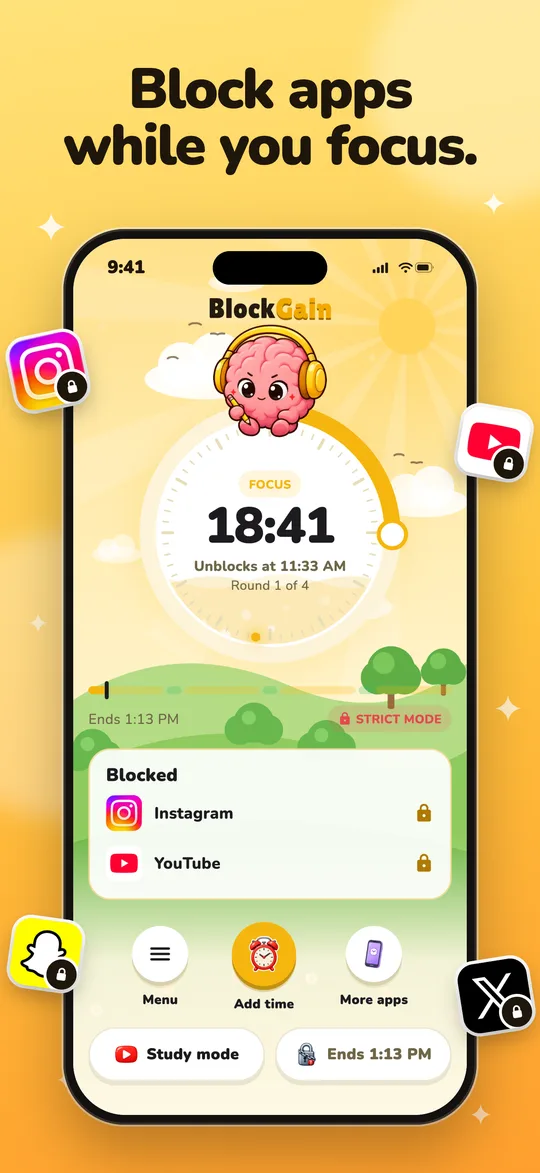 A BlockGain focus session: blocked apps show a stop screen until it ends.
Free: a daily limit for up to 3 apps, a plain focus timer, stop screens and screen time stats. To leave a focus session early, you hold "Leave early" for 5 seconds.
Pro ($19.99 a year with a 7-day free trial, $4.99 a month, or $39.99 lifetime) adds the parts that replace the Brick:
- Strict mode: no ending a focus session early.
- Strict schedules: a schedule that can't be turned off while it runs.
- Prevent uninstall: Screen Time stops apps being deleted while a block runs.
- Pomodoro rounds, unlimited apps, website blocking, Minimal and YouTube study mode.
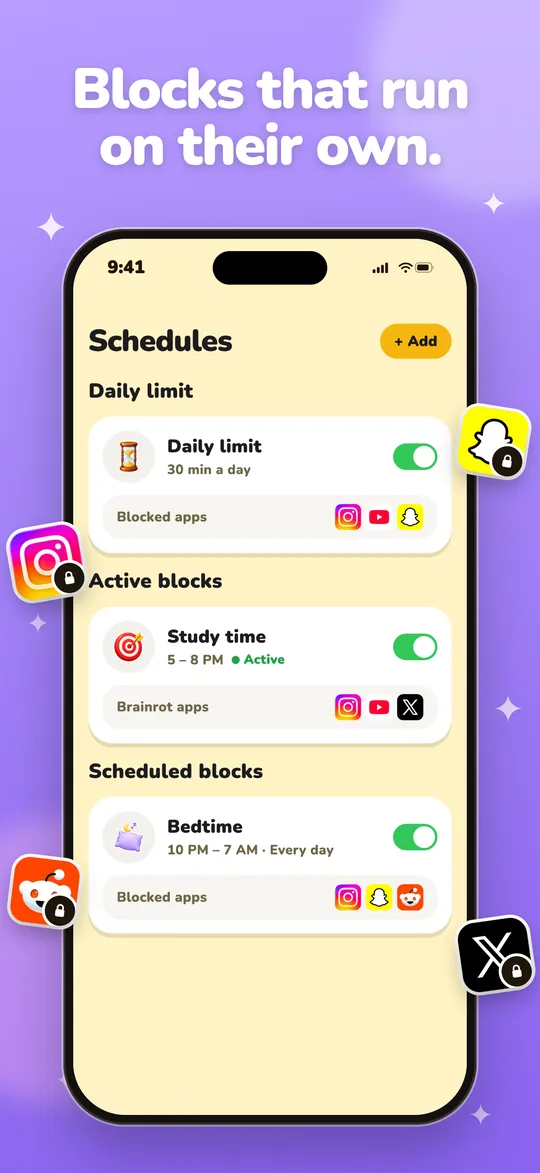 Schedules in BlockGain: set a strict one for evenings and it can't be switched off mid-way.
We explain when a hard block helps, and when it backfires, in strict mode explained.
The exit, without a spent emergency
Instead of a few emergency unbricks, BlockGain's daily limit has a slow exit.
Tap "Ask my inner self" on the stop screen. A notification opens BlockGain for two slow breaths. Then, if you still need it, pick 5, 10 or 15 minutes. The app locks again by itself.
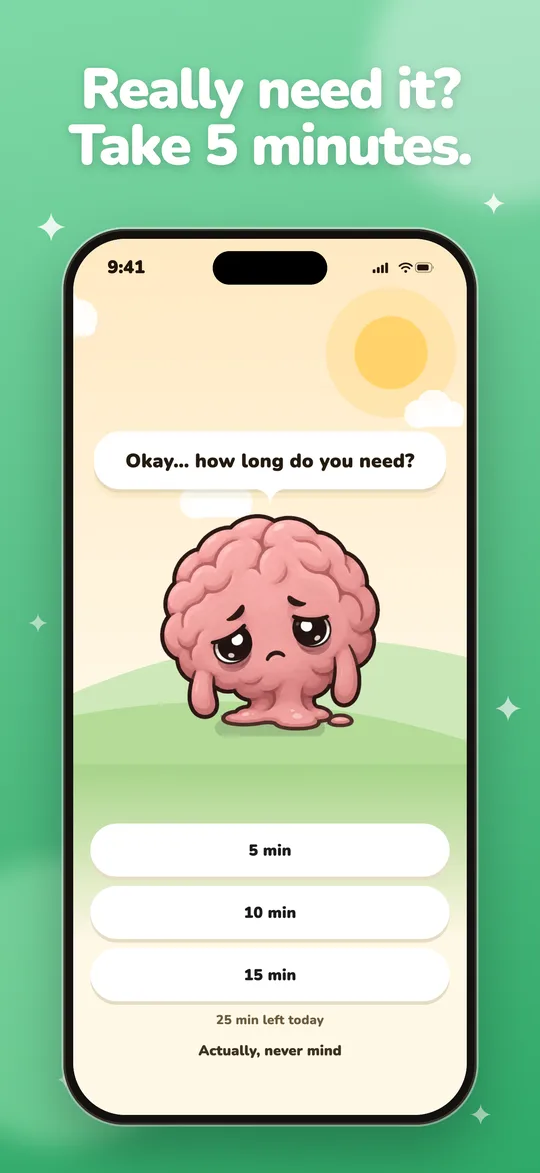 "Ask my inner self": two breaths first, then 5, 10 or 15 minutes, then it relocks.
You can always get the bus ticket. You just can't slide into an hour of scrolling. We wrote about why in why a short unblock beats a hard block.
BlockGain has no account and no ads, and your data stays on your phone.
2. Bloom: the closest device to Brick
Bloom is an NFC card you tap to lock and unlock apps and websites. When we checked, the card was $39 at full price. Its site says "Free app, no subscription".
Its App Store page lists an optional strict mode that stops you deleting the app during focus. Its FAQ says you get three emergency exits, plus one more every month.
3. Unpluq
Unpluq uses a keychain Tag that you tap to open blocked apps, on iPhone (iOS 16+) and Android. The Tag needs a Premium subscription. Its site also offers "digital barriers" instead of the Tag.
We couldn't confirm a clear price per plan on its home page, so we've left that out.
4. Apple Screen Time
Screen Time is free and already on your iPhone. You set app limits in Settings → Screen Time. The catch is that, on your own phone, the limit screen lets you tap "Ignore Limit".
A passcode someone else holds fixes that. See how to use a Screen Time passcode.
5. A phone lock box
The no-tech answer: put the phone in a box with a timer, or in a drawer in another room. Nothing to set up, nothing to bypass.
The downside is you lose calls and maps too. For study, see how to study with your phone in the room.
What we'd do, step by step
- Try the free app first. Install BlockGain, connect Screen Time and add your 3 worst apps to the daily limit.
- Use the focus timer for one study or work block a day.
- If you keep breaking it, try Pro free for 7 days and turn on strict mode or a strict schedule.
- Turn on Prevent uninstall so deleting the app isn't the way out.
- If you still want distance, buy a device like Brick or Bloom, or use a lock box.
Most people can tell within a week whether they need a physical barrier, or just a block that doesn't have a stop button. For more options, see the best app blocker for iPhone and Opal alternatives.
Sources
- Brick: home page and prices
- Brick: FAQ
- Brick: Emergency Unbricks
- Brick: iPhone setup guide (Screen Time access)
- Bloom: home page and FAQ
- Bloom on the App Store
- Unpluq: home page
- Apple Support: Set up Screen Time for yourself on iPhone
Common questions
Is there a Brick alternative without a device?
Yes. BlockGain blocks apps with Apple's Screen Time and needs no gadget. Strict mode and strict schedules (Pro) give you a block you can't end early, and the free daily limit covers up to 3 apps.
Does Brick use Screen Time on iPhone?
Yes. Brick's own iPhone setup guide says you grant it Screen Time access, and that Apple needs a passcode on the phone to set it up.
What happens if I lose my Brick?
Brick gives you 5 Emergency Unbricks in the app that unblock all apps. Brick says it can reset them if you run out, within 2 business days.
What is the Bloom app blocker?
Bloom is an NFC card you tap to lock and unlock apps on iPhone. When we checked, the card was $39 with a free app and no subscription.
Is a phone blocker device worth it?
It helps if physical distance is what you need. If you'd rather not buy or carry anything, an app with strict mode does the "can't undo it" part for less.

We build BlockGain, the screen time app for iPhone that blocks the apps that eat your day, with a breathing pause and a few minutes when you really need one. We write about focus, phone habits and getting your time back.