To stop doomscrolling on iPhone, make the scroll harder to start and easier to stop. Block the apps that pull you in with a blocker like BlockGain, keep a small, honest way in for real needs, and protect the hours you scroll most.
The short version:
- Find your trigger hours in Screen Time before you change anything.
- Block the two or three worst apps, not everything at once.
- Keep a short way in for real needs, so you don't delete the blocker on day three.
- Set a daily budget so "how much" is decided once, not every evening.
- Protect bedtime and mornings with a schedule that runs by itself.
Why doomscrolling feels impossible to stop
Feeds are built so there is no natural end. Every swipe might bring something new, so your brain keeps checking. That is why "I'll just stop" tends to fail at 11 PM.
The decision has to be made again with every swipe, and you make it when you are tired. The fix is to move the decision earlier. Decide once, while you are calm, and let your phone hold the line later.
That idea is the core of BlockGain. We built it so the hard choice happens in daylight, and the phone keeps it at night.
1. Look at your real numbers first
Open Settings → Screen Time and look at your daily average and your most used apps. Apple shows this for the day and the week. BlockGain's home screen shows the same picture: screen time, pickups and your top apps.
Most people are surprised by one app and one time of day. Write those two down. That is where to start.
2. Block the worst apps, not your whole phone
Blocking everything feels strong for an afternoon and then gets switched off. Pick the two or three apps that eat the most time.
Leave Messages, Maps and your bank alone. A block you can live with beats a strict one you remove. Our guide to blocking apps on iPhone walks through the setup.
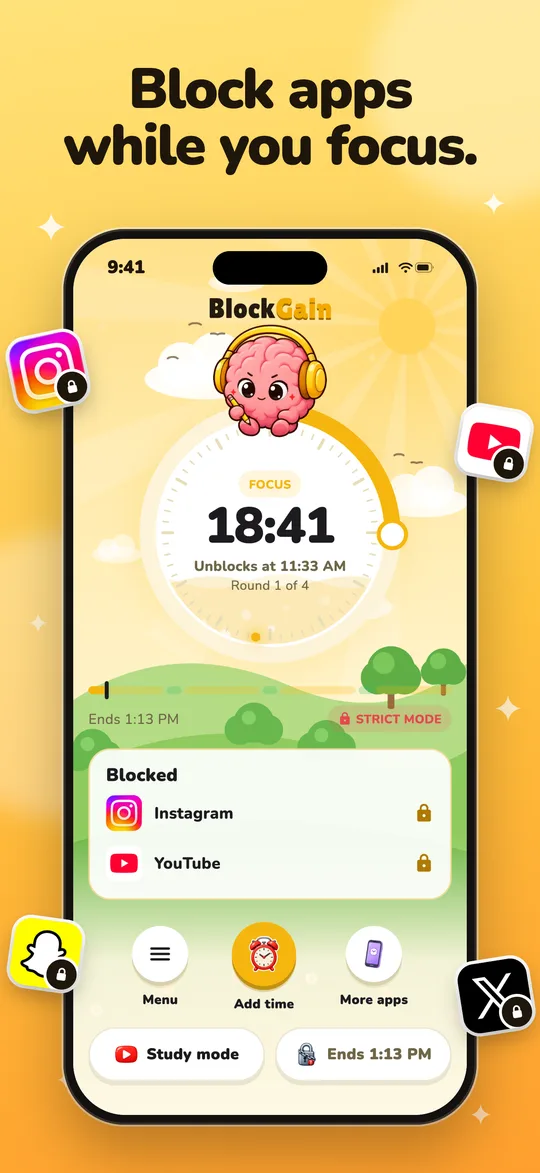 What a blocked app looks like in BlockGain: a stop screen instead of the feed.
3. Keep a small, honest way in
Sometimes you really do need Instagram for a message or YouTube for a class. If the only way in is turning the blocker off, you will. A better pattern is a short unblock.
In BlockGain, the stop screen has one button: "Ask my inner self". It sends a notification, and tapping it opens BlockGain for two slow breaths with the brain mascot. If you still badly need the app, you pick 5, 10 or 15 minutes, and it locks again when the time is up, even while you are in it.
That small pause is often enough to change your mind. We explain why in why a short unblock beats a hard block.
4. Give yourself a daily budget
Instead of "never", decide how much is fine. Thirty minutes a day, spent 5, 10 or 15 at a time, is a clear rule.
BlockGain's daily limit lets you choose 15, 30, 45, 60, 90 or 120 minutes. When it is gone, the apps stay blocked until midnight. You are not negotiating with yourself in bed.
| Approach | What happens at 11 PM | Does it last? |
|---|---|---|
| Willpower only | You decide again with every swipe | Rarely |
| Delete the app | You reinstall it, or use the website | Often not |
| Screen Time limit | You tap past the limit screen | Not on your own phone |
| Block everything | You switch the blocker off | A few days |
| Block a few apps, short unblocks | You pause, then choose | Much more often |
5. Put bedtime and mornings on a schedule
The scroll you regret most usually happens in bed. The Sleep Foundation says screens can delay sleep and recommends avoiding them in the hour before bed.
A schedule that blocks your feed apps from, say, 10 PM to 7 AM takes the decision away entirely. Screen Time can do a version of this with a schedule. BlockGain Pro has ready-made Bedtime and Morning routine presets.
 BlockGain's Bedtime preset: feeds shut while you sleep, and they open again in the morning.
There is more on the night side in a bedtime phone schedule that sticks.
6. Replace the gap
Scrolling often fills a small gap: waiting, a break, the first minutes after waking. Pick something for that gap ahead of time.
A short walk, a page of a book or one focus session all work. An empty gap gets filled by the nearest feed. BlockGain's block screens help here too, with offline ideas and tips that rotate each time you hit one.
7. Check in once a week
Look at your screen time once a week, not every hour. If one app crept back, tighten that one. If your daily budget feels too tight, loosen it a little.
BlockGain Pro's highlights show your best day, your busiest hour and your late-night scrolling. That makes the weekly check quick. The goal is a setup you keep, not a perfect week.
If the feed is the problem, not the app
Sometimes you need the app but not the scroll. Minimal, in BlockGain Pro, opens YouTube without Shorts and Instagram without Reels or the feed. Messages and search still work.
It suits people who use Instagram to talk to friends, or YouTube for tutorials. See how to use Instagram without Reels for the details.
What it costs
The daily limit for up to 3 apps and the focus timer are free. Pro adds schedules, strict mode, Minimal, website blocking and highlights. It is $19.99 a year with a 7-day free trial, $4.99 a month, or $39.99 once.
There is no account and no ads. Apple keeps your screen time data on your iPhone, and BlockGain never sees which apps you use.
Sources
- Apple Support: Set up Screen Time for yourself on iPhone
- Apple Support: Set Screen Time schedules and time allowances on iPhone
- Sleep Foundation: How does blue light from electronic devices affect sleep?
Common questions
Is doomscrolling a real addiction?
It is better to think of it as a strong habit loop. The steps above work on the habit: the trigger, the easy start and the missing stop.
Can I stop doomscrolling with Screen Time alone?
You can start there. Screen Time limits are easy to skip on your own phone, so many people add a blocker that makes skipping a deliberate, limited choice.
Should I delete social media?
If an app adds nothing, yes. For apps you still need for friends or school, blocking the scroll while keeping a short way in usually lasts longer than deleting.
How long until it feels normal?
Give a new setup a couple of weeks. The first days feel strange because the habit is still there; it fades as the phone stops rewarding it.

We build BlockGain, the screen time app for iPhone that blocks the apps that eat your day, with a breathing pause and a few minutes when you really need one. We write about focus, phone habits and getting your time back.