To stop checking your phone first thing, remove the reach and delay the feeds. Charge the phone away from your bed, block social apps until you're up (say until 9 AM), and give your hands a different first job.
The short version:
- Charge it out of reach so the alarm gets you out of bed.
- Block feeds for the first hours with a morning schedule, like BlockGain's Morning routine preset.
- Keep messages and calls working, so you don't miss anything important.
- Replace the reach with one small first task.
- Protect the night before, because late scrolling makes the morning harder.
Why the first scroll matters
Checking the phone in bed pulls your attention outward before you've decided anything about your day. Someone else's news, someone else's plans, someone else's feed.
Ten minutes becomes thirty, and you start the day already behind. Then the rest of the morning feels rushed, and the phone is the easy escape again.
That's why we built a Morning routine preset in BlockGain. The first hours of the day are where a small change pays back the most.
Why willpower doesn't work at 7 AM
When you've just woken up, you're not at your sharpest. The phone is right there, it's lit up, and reaching for it is the most familiar thing you do all day.
Deciding "I won't check it" the night before rarely survives the alarm. What works is making the choice for your morning self, so there's nothing to decide.
The three steps below do that. Each one takes a few minutes to set up and then runs by itself.
Step 1: move the charger
If the phone is across the room, the alarm gets you up, and the habit of grabbing it in bed breaks by itself. By the time you've walked over, you're already out of bed.
If you rely on the phone as an alarm, that's fine. Just put it out of arm's reach.
 Up, stretching, coffee in hand. The phone can wait across the room.
Step 2: a morning schedule
BlockGain's Morning routine preset (Pro) blocks the apps you choose from 6 to 9 AM on weekdays. Messages, calls and your alarm keep working. Change the times to fit you.
When you open a blocked app, you see a stop screen instead of the feed. The block screens rotate: tips, findings from studies, quotes and nudges, each with its own colour and brain mascot. You can turn them on or off in Settings → Block screens.
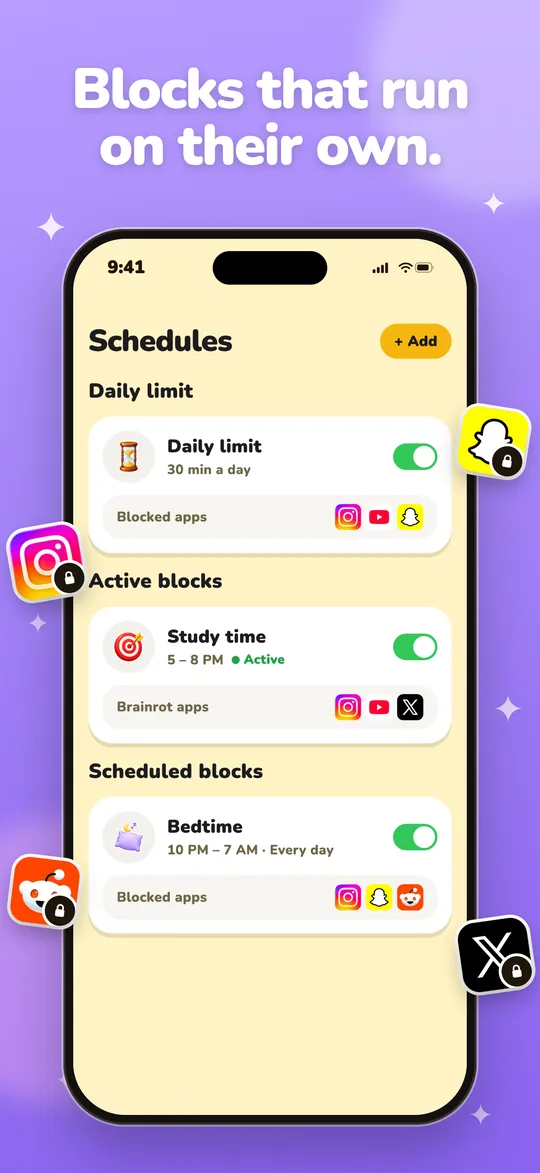 Schedules in BlockGain. Pick Morning routine, then adjust the hours and days.
If you'd rather not block the whole morning, the free daily limit works too. Your chosen apps stay blocked all day, and after two slow breaths you can open one for 5, 10 or 15 minutes when you really need it. We explain why in why a short unblock beats a hard block.
Step 3: give the reach a new job
The reach for the phone is a habit, and habits need a replacement, not just a gap. Pick one small thing your hands do first instead.
- Open the curtains or step outside for a minute.
- Drink a glass of water before anything else.
- Write the one thing you want to get done today.
- Make coffee or tea and drink it away from your phone.
Keep it small. The point isn't a perfect morning routine; it's a first five minutes that belong to you.
A morning, hour by hour
Here's how the setup looks on a normal weekday.
| Time | What happens | Why it helps |
|---|---|---|
| Alarm | Phone across the room gets you up | No scrolling in bed |
| First 30 minutes | Feeds blocked; messages and calls work | You start with your own plans |
| Until 9 AM | Morning routine keeps feeds blocked | The habit can't sneak back |
| After the schedule | Apps open again, with your daily limit | Checks stay short all day |
The morning starts the night before
A late night of scrolling makes the morning harder. You're tired, so the phone feels like an easy way to wake up.
The Sleep Foundation says screens can delay sleep and recommends avoiding them in the hour before bed. A bedtime block solves both ends: you sleep sooner and wake with less pull to scroll. Read how to set a bedtime phone schedule to set one up.
If you already scroll in bed at night, how to stop doomscrolling on iPhone covers that habit in more detail.
What about the apps you need?
You might need a few things in the morning: a message from family, your calendar, a bus time. That's fine. Only block the feed apps, and leave the rest open.
If Instagram is part of how you keep in touch, BlockGain's Minimal (Pro) opens Instagram without Reels or the feed, while messages and search still work. See Instagram without Reels for the details.
An iPhone Focus mode can help too. It filters notifications, so fewer things light up the screen while you get ready.
 Good morning, from you, before the feed gets a say.
What we'd do, step by step
- Move your charger across the room tonight.
- Install BlockGain and connect Screen Time.
- Turn on the Morning routine preset and pick your feed apps.
- Adjust the times if you start earlier or later than 6 to 9 AM.
- Choose one first task for your hands.
- Add a bedtime block so the night doesn't undo the morning.
Give it a week. The first few days are the hardest, and after that the morning starts to feel like yours again.
Sources
- Apple Support: Set up a Focus on iPhone
- Apple Support: Set Screen Time schedules and time allowances on iPhone
- Sleep Foundation: How does blue light from electronic devices affect sleep?
Common questions
Will a morning block stop my alarm?
No. Blocking apps doesn't touch the Clock app or BlockGain's alarms.
What if I need my email first thing?
Only block the feed apps. Leave email out of the schedule if you need it.
Are presets free?
Schedules and presets are part of BlockGain Pro. The daily limit is free for up to 3 apps.
Does this work on weekends?
Set the schedule to every day, or use a separate weekend time.
Can I still read messages in the morning?
Yes. Only the apps you choose are blocked, so messages and calls keep working.

We build BlockGain, the screen time app for iPhone that blocks the apps that eat your day, with a breathing pause and a few minutes when you really need one. We write about focus, phone habits and getting your time back.