If you can't stop watching YouTube Shorts, it's not a willpower problem: Shorts are built so there's never a moment to stop. The fix that lasts is to remove Shorts from your phone while keeping YouTube, for example with BlockGain's Minimal, and to put a short pause in front of the full app.
The short version:
- Shorts have no stopping point: the next one starts before you decide.
- Deciding to stop at midnight rarely works; changing what's on your phone does.
- BlockGain keeps YouTube and removes Shorts, with a short, breathe-first way into the full app.
Why one more Short never ends
A normal video has an end and a moment where you choose what's next. A Short doesn't. It's over in seconds, the next one is already playing, and every swipe might bring something better than the last.
That rhythm is why "just five minutes" turns into forty. The decision to stop has to be made again with every swipe, usually when you're tired. When we built BlockGain we saw the same pattern again and again: people weren't watching too much YouTube, they were watching too many Shorts.
Signs Shorts are taking over
- You open YouTube for one video and end up in the Shorts tab.
- You check the time and an hour has gone.
- You scroll Shorts in bed and sleep later than you meant to.
- Longer videos feel slow and hard to sit through.
If two or more sound familiar, it's worth changing your setup rather than trying harder.
What doesn't work (for long)
| Approach | What happens |
|---|---|
| "I'll just stop" | Works until you're tired, usually by evening |
| Delete YouTube | You reinstall it, or watch in Safari |
| Screen Time limit | One tap to ignore it |
| "Not interested" on Shorts | Fewer Shorts for a while, then they return |
| Remove Shorts, keep YouTube | The habit has nothing to land on |
What works: remove Shorts, keep YouTube
The goal isn't to quit YouTube. It's to keep the lectures, tutorials and channels you love and lose the endless scroll.
In BlockGain, Minimal opens YouTube with the Shorts tab, the Shorts shelf and the endless home feed switched off. You block the full YouTube app, so the Shorts version sits behind a stop screen. Step-by-step setup is in how to block YouTube Shorts on iPhone.
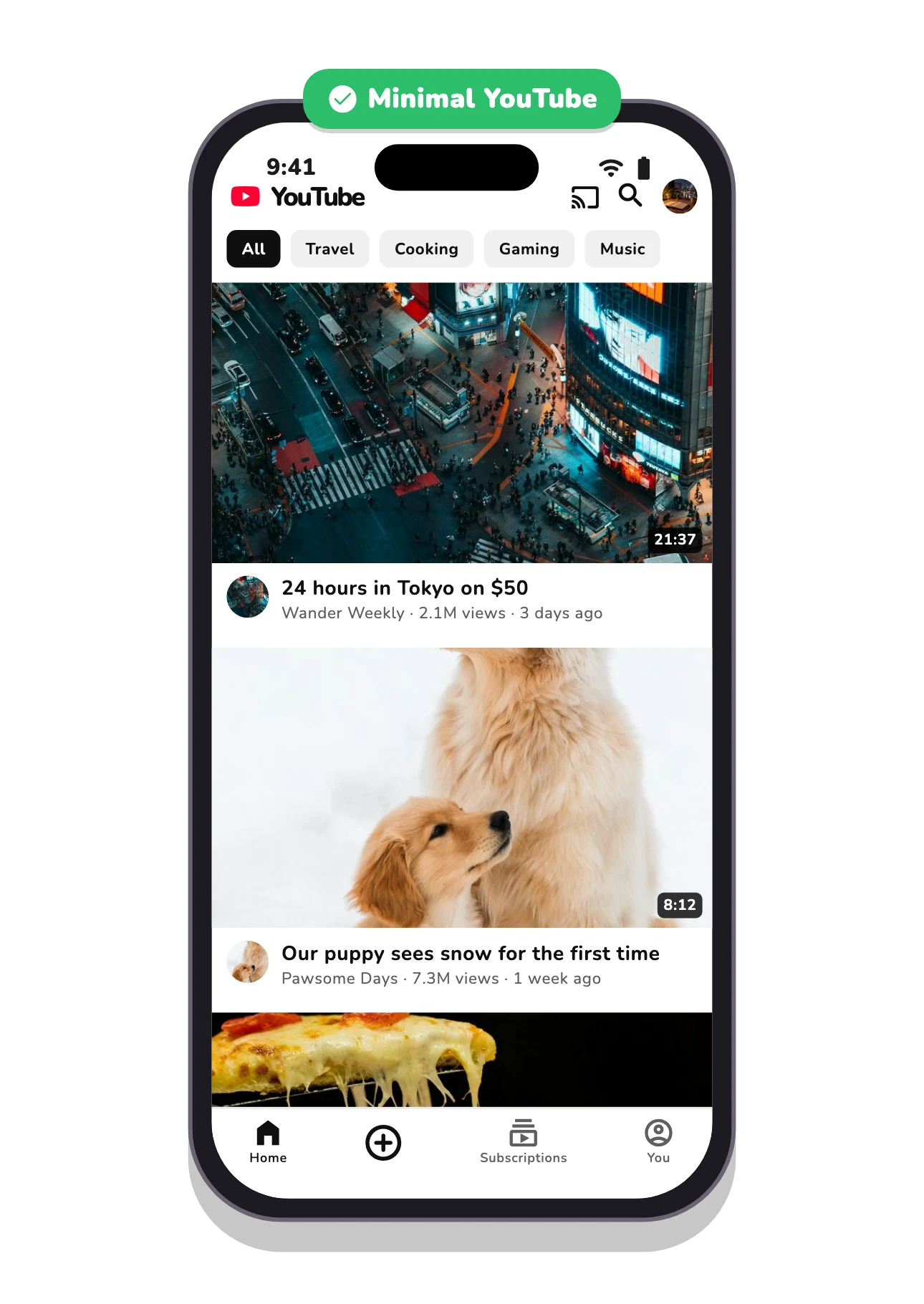 YouTube in Minimal: the videos you came for, no Shorts.
Add a pause, not a wall
A block with no way through gets switched off the first time you need the app. BlockGain's daily limit keeps YouTube blocked, but if you really need it, you ask, take two slow breaths, then get 5, 10 or 15 minutes for that one app before it locks again.
That small pause is often enough to change your mind. It turns an automatic swipe into a choice.
Protect the late-night hour
Shorts are hardest to resist in bed. Screens late in the evening can push sleep later, and the Sleep Foundation recommends avoiding them in the hour before bed. A bedtime schedule in BlockGain blocks YouTube every night, so there's no decision to make. More in bedtime phone habits.
 BlockGain's Bedtime preset blocks the apps you choose every night.
What to do in the gap
Shorts usually fill a small gap: waiting for a bus, a break between study sessions, the first minutes in bed. If that gap is empty, the nearest feed fills it. Decide in advance what goes there instead.
- Waiting: a podcast episode or one long-form video you chose on purpose.
- Study breaks: stand up, get water, look out of a window for five minutes.
- In bed: a few pages of a paper book, or tomorrow's plan in a notebook.
The replacement doesn't need to be impressive. It just needs to be ready before the urge arrives.
Swap Shorts for longer videos, on purpose
Long videos aren't the problem: a lecture, a documentary or a creator you love can be time well spent. The difference is choice. You pick a long video because you want it; Shorts pick you.
Try this for a week: before you open YouTube, name the video or channel you're there for. In Minimal there's no feed to wander into, so you watch it and close the app. That small habit is what turns YouTube back into a library instead of a slot machine.
A one-week plan
- Day 1: Look at your Screen Time and see how much YouTube you watch.
- Day 2: Block the full YouTube app in BlockGain.
- Day 3: Watch the YouTube you want in Minimal.
- Day 4: Add a bedtime block.
- Days 5–7: Notice how often you reach for Shorts, and how often you don't.
By the end of the week, most people find longer videos easier to enjoy again.
If you slip
You will, at some point, end up in a Shorts session anyway: on someone else's phone, in Safari, on a hard day. That's fine. Don't scrap the setup; look at how it happened and close that gap. If it was Safari, block youtube.com during your blocks. If it was the full app, keep your daily budget small so a slip stays at a few minutes.
Sources
- Sleep Foundation: How does blue light from electronic devices affect sleep?
- Apple Support: Set up Screen Time for yourself on iPhone
Common questions
Is YouTube Shorts addiction real?
For most people it is a strong habit rather than a medical condition. If scrolling is causing you real distress, talk to a doctor or counsellor.
Why can't I stop watching Shorts?
Each Short ends before you decide to stop, and the next one starts on its own, so there's no natural moment to put the phone down.
Should I delete YouTube?
You can keep it. Block the full app and use a Shorts-free view like BlockGain's Minimal for the videos you actually want.
How long does it take to stop?
There's no fixed timeline, and it differs for everyone. Making Shorts harder to reach takes away the easy trigger, which is the part you can control.

We build BlockGain, the screen time app for iPhone that blocks the apps that eat your day, with a breathing pause and a few minutes when you really need one. We write about focus, phone habits and getting your time back.